
CPT is short for Color Palette Table, a file format popularized by the Generic Mapping Tools (GMT) for defining colormaps as piecewise-constant color bands between numeric boundaries.
The cpt-city website maintained by J. J. Green is a community-curated archive of color palettes collected from many projects (e.g., GMT, cmocean, Matplotlib, and more). Palettes are organized in family folders and typically include metadata files like DESC.xml and COPYING.xml that describe provenance and licensing.
This package is shipped with a cpt-city/ directory that contains the entire archive obtained from the website. The archive can be rebuilt with the pycpt.update_bundle() method. Be mindful that individual palettes may carry different licenses-refer to the accompanying COPYING.xml files. This archive only contains palettes for which redistribution is permitted. Learn more at on the cpt-city website.
The simplest way to install PyCPT is via pip: pip install pycpt
This package parses common CPT formats (including GMT-style lines) and exposes a simple Palette API that you can read from a CPT file with the name of a palette from the bundled cpt-city/ folder, or a path to any CPT file. The reader supports flexible path resolution: you can pass either an absolute/relative file path, or a short name underneath a bundled cpt-city/ data folder (extensionless is fine, .cpt is added automatically).
Once loaded, the Palette object provides several useful attributes and methods, such as:
palette.cmapto be used with Matplotlib plotting functionspalette.normto preserve original CPT boundaries
And many helpers to inspect, scale and interpolate the palette, or plot colorbars and previews. The following sections illustrate some of these features.
%config InlineBackend.figure_format = 'svg'

import matplotlib.pyplot as plt
import numpy as np
import pycptThe method pycpt.read accepts either a short name relative to the bundled cpt-city archive (e.g., "cmocean/algae", "cl/fs2010", or simply "algae" when unique), or a file path on disk. The file extension (.cpt) is optional and added automatically.
You can also set the logical palette type with kind ("sequential" or "diverging"). If divering is selected, the later scaling is centered around the diverging point (default 0).
palette = pycpt.read("wiki-2.0", kind="diverging", diverging_point=0)
palette.plot()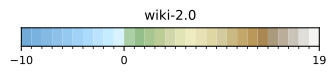
You can load palettes from many families (e.g., cmocean, xkcd, gmt, wkp, …). Later in this notebook, we’ll list an entire family with pycpt.files.get_family(...) and preview each palette quickly.
Below we switch to another palette and preview its bands.
palette = pycpt.read("cmocean/algae")  # also work with "algae"
palette.plot()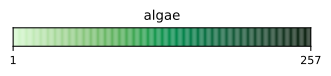
There are two common ways to apply a palette:
- Using only
cmaplets Matplotlib rescale colors to your data range (smooth but may shift intended boundaries). - Using
cmaptogether withpalette.normpreserves the original CPT boundaries (discrete bands at the authored values).
In the next code cell, the three panels show:
- Left:
cmaponly (colors are rescaled to the data range). - Middle:
cmap + norm(colors follow original boundaries). - Right: Same palette after
palette.scale(vmin, vmax)andpalette.interpolate(n=...), then used withcmap + normand a matching colorbar viapalette.colorbar(...).
Tip: For diverging data centered at a value, read with kind="diverging" and pass the center to palette.scale(vmin, vmax, at=center) so left/right segments preserve their balance.
# Create data
x = y = np.linspace(-1, 1, 200)
x, y = np.meshgrid(x, y)
z = 4000 * (x + np.sin(y) + 0.5) + 1000
sea_level = 0

# Get colormap and norm from palette
cpt = pycpt.read("colombia", kind="diverging")

# Create figure
fig, ax = plt.subplots(ncols=2, nrows=2, sharex=True, sharey=True)
ax = ax.flatten()

# Without norm
vals = ax[0].pcolormesh(x, y, z, cmap=cpt.cmap, rasterized=True)
fig.colorbar(vals, ax=ax[0], label="$z$ values", pad=0.1)
ax[0].clabel(ax[0].contour(x, y, z, levels=[sea_level]), [sea_level])

# With norm
vals = ax[1].pcolormesh(x, y, z, norm=cpt.norm, cmap=cpt.cmap, rasterized=True)
fig.colorbar(vals, ax=ax[1], label="$z$ values", pad=0.1, norm=cpt.norm)
ax[1].clabel(ax[1].contour(x, y, z, levels=[sea_level]), [sea_level])

# With norm
cpt.scale(-5000, 10000)
ax[2].pcolormesh(x, y, z, norm=cpt.norm, cmap=cpt.cmap, rasterized=True)
cpt.colorbar(ax=ax[2], label="z values", pad=0.1)
ax[2].clabel(ax[2].contour(x, y, z, levels=[sea_level]), [sea_level])

# Interpolated norm
cpt.interpolate(257)
ax[3].pcolormesh(x, y, z, norm=cpt.norm, cmap=cpt.cmap, rasterized=True)
cpt.colorbar(ax=ax[3], label="z values", pad=0.1)
ax[3].clabel(ax[3].contour(x, y, z, levels=[sea_level]), [sea_level])

# Labels
ax[0].set(title="Basic", ylabel="$y$ axis")
ax[1].set(title="Original norm")
ax[2].set(title="Rescaled norm", xlabel="$x$ axis", ylabel="$y$ axis")
ax[3].set(title="Interpolated norm", xlabel="$x$ axis")

fig.tight_layout()
plt.show()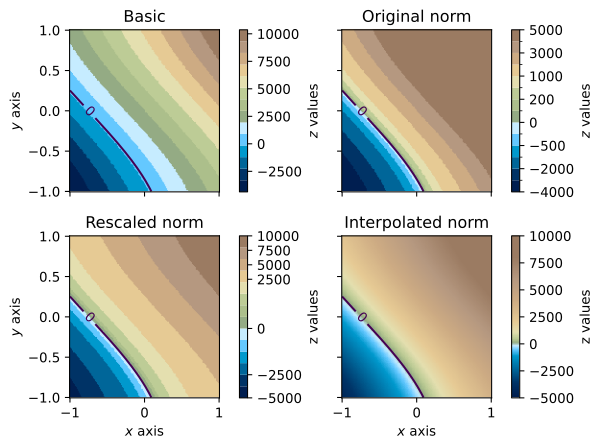
import cartopy.crs as ccrs

from matplotlib.colors import LightSource
from pygmrt.tiles import download_tiles
from scipy.ndimage import gaussian_filter

# La Réunion Island topography and bathymetry
tiles = download_tiles(bbox=[55.05, -21.5, 55.95, -20.7], resolution="low")
topo = tiles.read(1)
bbox = tiles.bounds
extent = (bbox.left, bbox.right, bbox.bottom, bbox.top)

# Palette
palette = pycpt.read("wiki-france", kind="diverging")
palette.scale(-4000, 3000)
palette.interpolate(257)

# Create figure
fig = plt.figure(figsize=(7, 7))
ax = plt.axes(projection=ccrs.PlateCarree())

# Hillshade
sun = LightSource(azdeg=45, altdeg=50)
shaded = sun.shade(
    topo,
    cmap=palette.cmap,
    norm=palette.norm,
    vert_exag=0.02,
    blend_mode="soft",
)

# Show
ax.imshow(shaded, extent=extent, transform=ccrs.PlateCarree())

# Extra map features
gridlines = ax.gridlines(draw_labels=True, color="white", alpha=0.3)
gridlines.top_labels = False
gridlines.right_labels = False
palette.colorbar(ax=ax, label="Elevation (m)", pad=0.1, shrink=0.5)
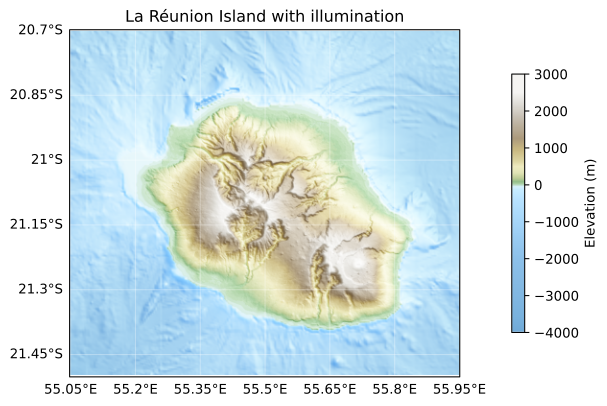
ax.set_title("La Réunion Island with illumination")

plt.show()
Text(0.5, 1.0, 'La Réunion Island with illumination')
pycpt.files.get_family(name) returns all CPT files under a given family. This is handy to browse a collection and quickly preview each palette’s discrete bands.
Below, we grid a few palettes from the wkp family and call palette.plot on each. Unused axes are hidden for clarity.
# List all GMT palettes
files = pycpt.get_family("gmt")

# Plot all palettes in a grid
n_cols = 2
n_rows = int(np.ceil(len(files) / n_cols))
fig, axes = plt.subplots(
    figsize=(7, n_rows / 1.1),
    ncols=n_cols,
    nrows=n_rows,
    gridspec_kw={"wspace": 0.3, "hspace": 4},
)
axes = axes.ravel()

# Plot
for ax, filepath in zip(axes, files):
    pycpt.read(filepath).plot(ax=ax)

# Clear unused axes
for j in range(len(files), len(axes)):
    axes[j].axis("off")

plt.show()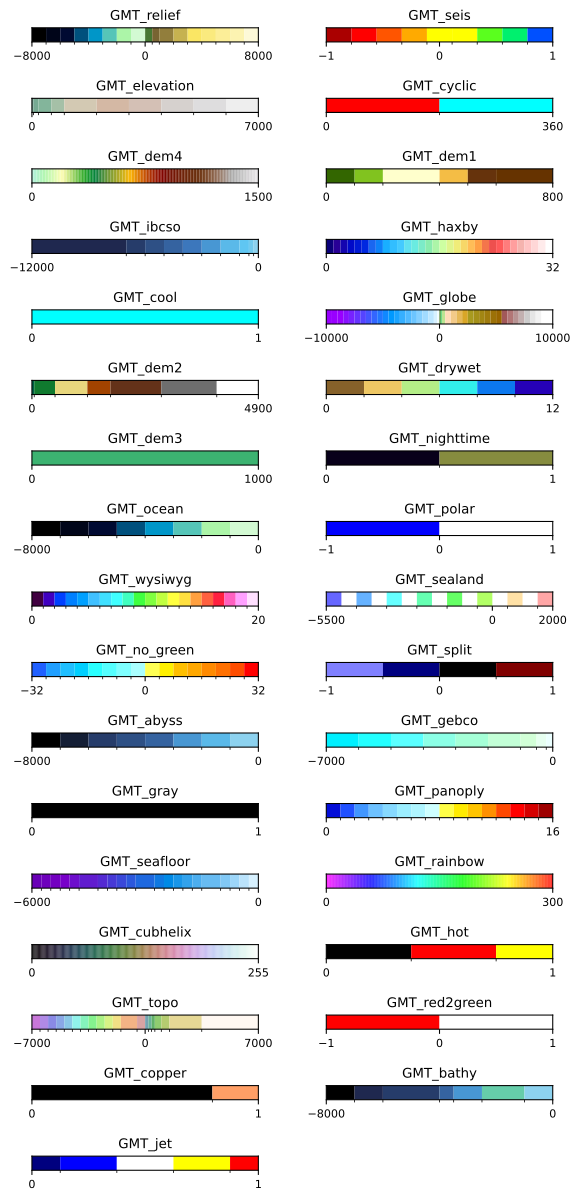
The files from the cpt-city website are bundled in the cpt-city/ folder. You can also download the latest archive from here and extract it to replace the existing folder.
Alternatively, there is a helper function pycpt.files.update_bundle() that downloads and extracts the latest archive automatically.
pycpt.update_bundle()Contributions are welcome! Please refer to the CONTRIBUTING.md file for guidelines on how to contribute to this project.
This notebook was generated with the nbconvert tool. To regenerate it, run:
python build_readme.py