Status: Proof-of-Concept / Work-in-Progress
This project is an interactive graphical user interface (GUI) tool built to visualize and explore dynamic binary analysis results generated by the Triton Framework. It aims to assist with Reverse Engineering (RE) and Vulnerability Research (VR) tasks by providing clear visual feedback on program execution, data flow, and path feasibility.
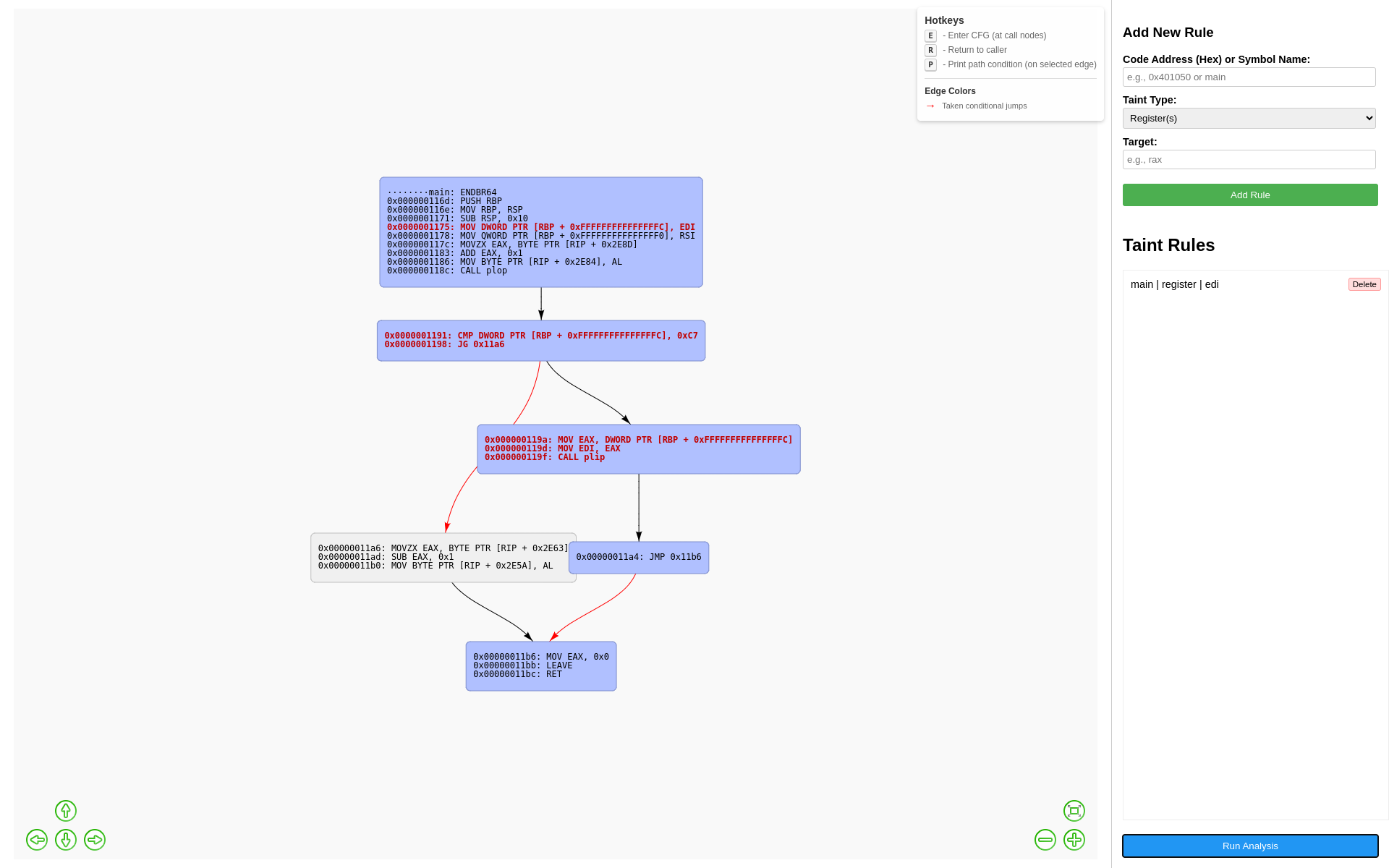
- Control Flow Graph (CFG) Visualization: Displays the CFG of the analyzed function, leveraging the Miasm Framework for disassembly and block identification.
- Execution Trace Highlighting: Clearly marks the basic blocks executed during a dynamic run within the CFG.
- Taint Propagation Visualization:
- Allows users to define taint sources (registers, absolute memory, relative memory addresses) at specific program points.
- Highlights instructions that read from or write to tainted data during execution, visually tracking data flow.
- Symbolic Path Condition Querying: Leverages Triton's dynamic symbolic execution (DSE) capabilities to extract and display the specific constraints required to take a particular branch (edge) in the CFG.
- Interactive Exploration:
- Supports basic call graph navigation (entering/exiting functions within the visualized trace context).
- Provides hotkeys for common actions (Enter Function 'E', Return 'R', Print Path Condition 'P').
- Cross-Platform Backend: Uses Python for the analysis backend.
- Web-Based Frontend: Utilizes Eel and JavaScript (Vis.js) for the GUI, making it accessible via a web browser.
- Binary Loading: Parses the target binary using LIEF to identify architecture and load memory segments.
- CFG Generation: Uses Miasm's disassembler engine to construct the CFG for the target function.
- Triton Emulation: Initializes a Triton context and emulates the binary's execution from the specified entry point.
- Taint Application: During emulation, applies user-defined taint rules when the program counter reaches specified trigger addresses.
- Analysis & Data Collection: Triton processes instructions, tracks taint propagation, and collects symbolic path constraints. The tool records the execution trace and identifies tainted instructions.
- Visualization: The Python backend sends the CFG structure, trace information, taint markings, and path constraints (on demand) to the JavaScript frontend via Eel. Vis.js is used to render the interactive graph.
- Python 3.x
- Triton Framework:
- LIEF:
- Miasm:
- Eel:
pip install eel
Note: Triton, LIEF, and Miasm might have additional system-level dependencies depending on your OS. Please refer to their respective documentation.
- Clone the repository.
- Install the dependencies (see above).
- Run the main Python script from your terminal:
python triton_gui_tool.py <path_to_binary> [optional_function_name]
<path_to_binary>: Path to the ELF binary you want to analyze.[optional_function_name]: Name of the function to start analysis from (defaults to "main" if omitted).
- Eel will typically open a browser window automatically displaying the GUI.
- Interaction:
- Use the right-hand panel to add taint rules (specify trigger address, type, target, size, etc.).
- Click the "Run Analysis" button to start the Triton emulation and taint tracking.
- The graph will update, highlighting the executed path (blue nodes) and tainted instructions (bold red text).
- Click a node representing a function call and press 'E' to enter its CFG (if traced).
- Press 'R' to return to the caller's CFG.
- Click an edge (arrow between blocks) and press 'P' to query and display the symbolic path condition required to take that specific branch.
- This tool is currently a proof-of-concept and work-in-progress.
- Tested primarily on Linux x86_64 ELF binaries. Support for other architectures/formats depends on LIEF, Miasm, and Triton capabilities.
- Syscall handling is minimal/basic and likely needs expansion for complex binaries.
- Performance may degrade on very large binaries or long execution traces.
- The UI is functional but basic.
- More robust syscall emulation.
- Support for more architectures and binary formats.
- Saving/loading analysis state and taint rules.
- Integration of memory diffing or state comparison features.
- More sophisticated taint policies.
- UI enhancements (search, filtering, better layout options).