Deafine is a simple Python accessibility tool that provides real-time speaker diarization and live transcription using ElevenLabs API for deaf and hard-of-hearing users.
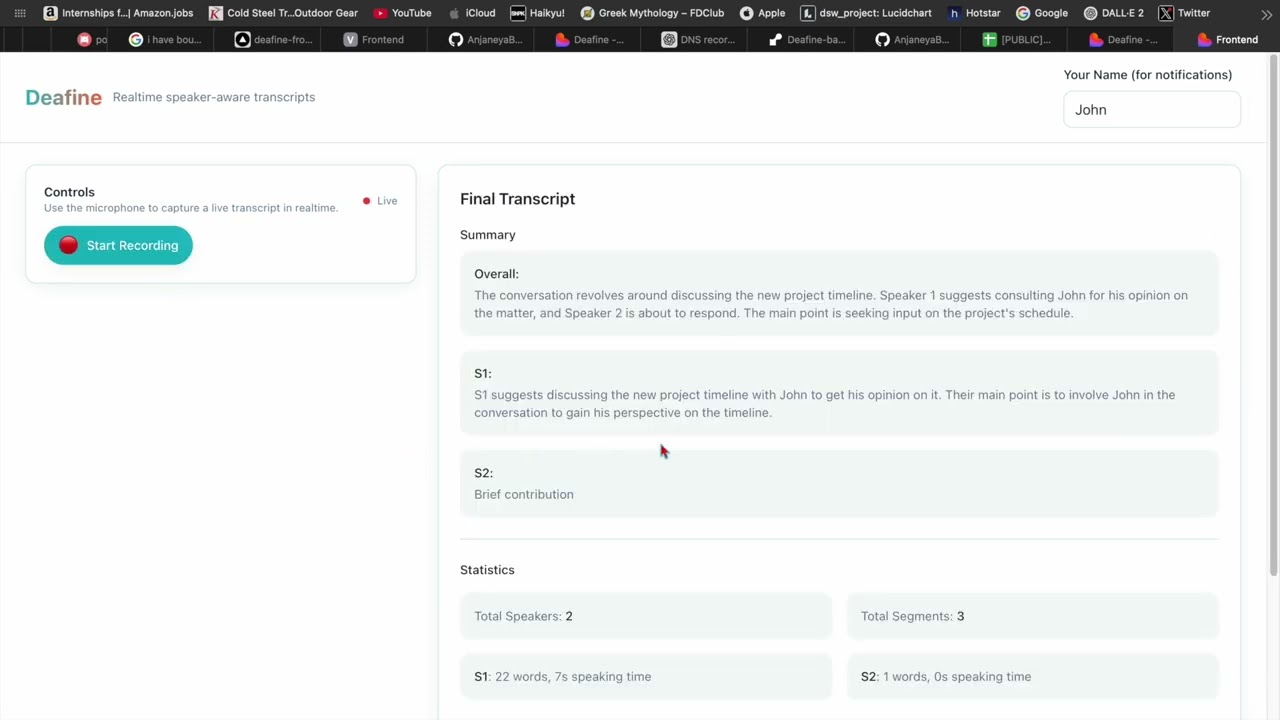
Click the image above to watch the demo on YouTube.
- 🎤 Real-time microphone capture (Console mode)
- 🌐 WebSocket API - Stream audio from browser for live transcription
- 👥 Automatic multi-speaker detection (S1, S2, S3...) via ElevenLabs
- 📝 Live transcription with speaker labels (full text, not summarized)
- 🔀 Overlap detection when multiple speakers talk simultaneously
- 💾 Optional recording to save audio and transcripts
- 📊 Session summaries - Generated when closing (overall + per-speaker)
- 🚀 FastAPI REST API - Upload audio files or stream via WebSocket
- ⚡ Simple and fast - no local ML models, no build tools required
- 💰 Optional VAD - Save bandwidth and API costs (if webrtcvad installed)
# Create virtual environment
python -m venv .venv

# Activate (Linux/Mac)
source .venv/bin/activate

# Activate (Windows)
.venv\Scripts\activate

# Install dependencies
pip install -e .

# Copy environment template
cp env.template .env
# (or on Windows: copy env.template .env)IMPORTANT: You need an ElevenLabs API key.
- Get your API key from https://elevenlabs.io
- Edit
.envand add your key:
ELEVEN_API_KEY=your_key_hereBasic usage:
audio-access runWith recording enabled:
audio-access run --recordStart the FastAPI server:
uvicorn audio_access.api:app --reload --host 0.0.0.0 --port 8000Or with Docker:
docker-compose up --buildAPI will be available at http://localhost:8000
REST API Endpoints:
POST /transcribe- Upload audio file for transcriptionPOST /transcribe/stream- Async transcription for large filesGET /health- Health checkGET /docs- Interactive Swagger UI
WebSocket API:
ws://localhost:8000/ws/transcribe- Real-time audio streamingGET /ws/sessions- List active WebSocket sessions
See WEBSOCKET_API.md for WebSocket integration guide.
Microphone → [Optional VAD] → ElevenLabs API → Live Transcription with Speakers
- Audio Capture: Records from microphone at 16kHz mono
- VAD (Optional): Filters silence to save bandwidth (if installed)
- ElevenLabs: Transcribes and identifies speakers (sent every 5 seconds)
- Display: Shows live output in console
Browser Mic → WebSocket → FastAPI → ElevenLabs API → WebSocket → Frontend Display
- Frontend: Captures audio from browser microphone (16kHz, 16-bit PCM)
- WebSocket: Streams audio chunks to backend in real-time
- ElevenLabs: Backend processes audio and identifies speakers
- WebSocket: Backend streams transcript segments back to frontend
- Frontend: Displays live transcription with speaker labels
See WEBSOCKET_API.md for integration details.
- Python 3.9+
- ElevenLabs API key (required)
- Microphone access
- Internet connection
To save ~60% bandwidth and API costs, install webrtcvad:
Linux/Mac:
pip install webrtcvadWindows: Requires Microsoft C++ Build Tools
# Install from: https://visualstudio.microsoft.com/visual-cpp-build-tools/
# Then:
pip install webrtcvad
Docker/Cloud: Works automatically (Linux-based)
The app works fine without VAD - it just sends all audio instead of filtering silence.
Console Mode:
audio-access run [OPTIONS]

Options:
  --record    Save audio and transcript to disk
  --help      Show help message
API Mode:
# Start API server
uvicorn audio_access.api:app --reload

# Or with Docker
docker-compose up┌─ 🎤 Deafine - Live Transcription (ElevenLabs) [00:45] ─────┐
│ Speaker | Live Transcript │
│ ────────────────────────────────────────────────────────── │
│ S1 | Hello, how are you today? │
│ S2 | I'm doing great, thanks! │
└─────────────────────────────────────────────────────────────┘
Edit .env to configure:
# Required
ELEVEN_API_KEY=your_key_here

# Optional: Enable/disable VAD (if webrtcvad installed)
DEAFINE_USE_VAD=true
DEAFINE_VAD_AGGRESSIVENESS=2  # 0-3 (higher = more aggressive)

# How often to send audio to ElevenLabs (seconds)
DEAFINE_ELEVENLABS_CHUNK_SECS=5

# Audio processing
DEAFINE_CHUNK_MS=320
DEAFINE_HOP_MS=160When you stop the app (Ctrl+C), you'll see:
📊 SESSION SUMMARY
======================================================================

📝 Overall Conversation:
   Discussion about testing the Deafine app and confirming it works.

👥 Speaker Summaries:

   S1:
      Initiated testing of the application and asked for confirmation.
      (45 words, 12.3s speaking time)

   S2:
      Confirmed the application is working correctly.
      (23 words, 6.1s speaking time)

📈 Statistics:
   Total Speakers: 2
   Total Segments: 8
Install:
pip install langchain langchain-openaiGet API key at: https://openrouter.ai/keys
Add to .env:
OPENROUTER_API_KEY=your_key
OPENROUTER_MODEL=mistralai/mistral-small-3.2-24b-instruct:free  # FREE! or use any model from OpenRouter
Benefits:
- ✅ Access to multiple AI providers (OpenAI, Anthropic, Google, Meta, etc.)
- ✅ Often cheaper than direct OpenAI
- ✅ Better summaries than extractive method
- ✅ Choose your preferred model
Popular Models:
mistralai/mistral-small-3.2-24b-instruct:free- FREE! Fast and good quality (default)openai/gpt-4o-mini- Fast and cheap ($0.15/1M tokens)anthropic/claude-3-haiku- Great quality, affordablegoogle/gemini-pro- Free tier availablemeta-llama/llama-3.1-8b-instruct:free- Open source, free
See all models: https://openrouter.ai/models
When using --record, three files are created:
session_YYYYMMDD_HHMMSS.wav- Audio recordingsession_YYYYMMDD_HHMMSS_transcript.jsonl- Transcript with timestampssession_YYYYMMDD_HHMMSS_summary.md- Session summary (generated on close)
"ELEVEN_API_KEY is required"
- Make sure you've created
.envfile with your ElevenLabs API key
No audio detected
- Check microphone is connected and not muted
- Try different microphone if available
Slow transcription
- Normal behavior - transcription happens every 5 seconds
- Adjust
DEAFINE_ELEVENLABS_CHUNK_SECSin.envfor faster updates (uses more API calls)
Want to reduce API costs?
- Install webrtcvad:
pip install webrtcvad - Saves ~60% by filtering silence
| Mode | Bandwidth | API Costs | Installation |
|---|---|---|---|
| Without VAD | 100% | Higher | ✅ Easy (no build tools) |
| With VAD | ~40% | Lower |
MIT License - Built for accessibility