






Lightweight, dependency-free logging for .NET — a thin, easy-to-read wrapper around Console,
file streaming, XDocument and friends, behind a single ILoggerLite interface. Targets
netstandard2.0 and net8.0.
dotnet add package LoggerLiteLots of everyday code is just "write this somewhere." Full-featured logging frameworks are powerful but can be heavy, opaque, or awkward to target portably. LoggerLite is the opposite: one small interface, a handful of implementations, no external dependencies, and a test suite covering the behavior. If you want something you can read in one sitting and drop into any project, this is it.
| Logger | Output |
|---|---|
ConsoleLogger |
colored console (per-severity colors) |
DebugLogger |
System.Diagnostics.Debug trace |
JsonFileLogger |
newline-delimited JSON file |
YamlFileLogger |
YAML file |
XLogger |
XML document |
HtmlLogger |
HTML (XSLT-transformed) |
AggregateLogger |
fans one message out to several loggers |
QueuedLoggerWrapper |
buffers + debounces writes to a wrapped logger |
All implement ILoggerLite:
public interface ILoggerLite
{
    void LogInfo(string message);
    void LogInformation(string message);              // alias for LogInfo
    void LogSuccess(string message);
    void LogWarning(string warning);
    void LogError(string error);
    void LogError(Exception exception);
    void LogError(Exception exception, string description);
    void Log(string message, MessageSeverity severity);

    bool FlushAuto { get; }   // true => writes immediately; false => call Save()/Flush()
    bool IsThreadSafe { get; }
    int Requests { get; }     // total Log* calls
    int Successes { get; }    // succeeded
    int Failures { get; }     // threw internally (logging never throws to the caller)
}
Logging never throws: failures are swallowed and counted in Failures.
using LoggerLite;

var logger = new ConsoleLogger();
logger.LogInfo("info!");
logger.LogSuccess("done");
logger.LogWarning("warning");
logger.LogError("error :(");
FileLoggerBase subclasses flush automatically — no need to call Save:
using System;
using LoggerLite;

var logger = new JsonFileLogger("log.json");
logger.LogInfo("info");
logger.LogError(new Exception("boom"), "while processing order 42");using System.Diagnostics;
using System.IO;
using LoggerLite;
var outputFile = new FileInfo(Path.ChangeExtension(Path.GetRandomFileName(), "html"));
var logger = new HtmlLogger();
logger.LogInfo("info");
logger.LogWarning("warning");
logger.LogError("error, but not really :)");
logger.Save(outputFile);
Process.Start(new ProcessStartInfo { FileName = outputFile.FullName, UseShellExecute = true });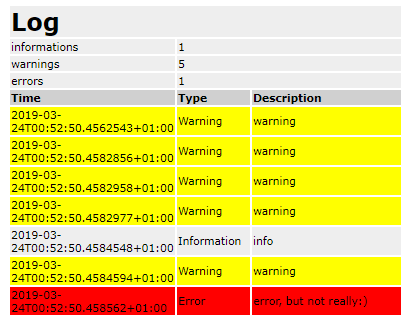
using LoggerLite;

var logger = new AggregateLogger(new ConsoleLogger(), new JsonFileLogger("log.json"));
logger.LogInfo("goes to both the console and the file");Wrap any FormattedLoggerBase to batch writes through a debouncer:
using LoggerLite;

using var logger = new QueuedLoggerWrapper(
    new FileLoggerBase("log.log"),
    new PassiveDebouncer { DebounceMilliseconds = 250 });

logger.LogInfo("buffered");
logger.Flush(); // force pending writes- Custom formatting per logger via the
Formatterproperty (Func<string level, string message, string>). - Targets
netstandard2.0(broad reach) andnet8.0; no external dependencies.
MIT — see License.txt. Contributions welcome.