
SR-ImpEx is a Blender add-on for importing and exporting BattleForge and Skylords Reborn 3D models, animations, skeletons, materials, and collision data in .drs, .bmg, and .ska formats.
Follow these steps to install the add-on into Blender:
- Download the latest release (
Battleforge_Blender_*.zip) from the Releases section. - Open Blender.
- Navigate to
Edit > Preferences > Add-ons. - Click on the
Install...button. - Select the downloaded
.zipfile and clickInstall Add-on. - Ensure that the checkbox next to Battleforge Model Importer/Exporter is enabled.
- Open Blender.
- Go to
File > Import. - Choose the Battleforge (.drs/.bmg) file type.
- Select your desired model file to import.
-
Open Blender
Launch Blender as you normally would. -
Import Battleforge Scene
- Go to File > Import > New Battleforge Scene (no file selection needed).
-
Choose Model Type & Collision
- In the import panel, select:
- Model Type: Static or Animated
- Collision: Box, Sphere, or Cylinder if required
- In the import panel, select:
-
Create New Battleforge Scene
- Click the New Battleforge Scene button.
- Blender generates the required
DRSModel_*collection hierarchy.
-
Organize Collections
- (Optional) Delete the original
Collectionhierarchy. - Work within the Battleforge collections.
- (Optional) Delete the original
-
Rename Your Model Collection
- In the Outliner, rename
DRSModel_object_CHANGENAMEto your model name.
- In the Outliner, rename
-
Add Meshes
- Create/import meshes and move them into
Meshes_Collection.
- Create/import meshes and move them into
-
Assign Materials
- Switch to the Shading workspace.
- Open the Asset Browser and under Battleforge Asset Lib, drag-and-drop:
- ColNorPar for Color, Normal, Parameter maps
- ColNorParRef to include Refraction map
- Ensure all wanted texture nodes feed into the DRS Material node.
-
Generate Collision Shapes (optional)
- Add a primitive (Box/Sphere/Cylinder), scale/position around your mesh, and put it inside the right sub-collection.
-
Export to .drs
- Select your model collection.
- Go to File > Export > Battleforge (.drs).
- Verify File Name and options:
- Apply Transform (default)
- Split Mesh by UV Islands (default)
- Flip Normals (default): Sometimes your model appears to be inside-out, change this optio to fix it
- Keep Debug Collection
- Model Type: static/animated with/without collision
- Click Export DRS.
- DRS/BMG import: Meshes, materials (color/normal/parameter/refraction), collision shapes, armatures/skins, animations; building mesh-grid states for BMG assets.
- DRS export: Static and animated models with collision, UV island splitting, transform application, debug collection retention.
- SKA animation export/import: Create or edit SKA clips, map actions to abilities and animation types.
- Material helpers: DRS shader node group, texture suffix conventions (
_col,_nor,_par,_flu), parameter/flow controls, alpha/decal toggles. - Collision + OBB tools: Generate and visualize OBB trees, manage collision shape collections.
- Data editors (View 3D > Sidebar > DRS Editor unless noted):
- Animation Set Editor: map Blender actions to DRS animation types/abilities, manage ability metadata and visibility jobs.
- Effect Set Editor: edit EffectSet blobs (animations, variants, sounds) stored on
DRSModel_*collections. - Locator Editor: manage
CDrwLocatorListentries (bone-local/world locators) with per-locator transforms and IDs. - Material Flow / Flags Editor: drive DRS shader inputs (flow speed/scale, alpha/decal flags, normal/parameter/refraction toggles).
- OBB Debug Tools: build and depth-filter OBBTree visualizations under
Debug_Collection. - BMG State Editor (View 3D > Sidebar > BMG Editor): toggle building states (
S0,S2, debris, destroyed) and collision visibility.
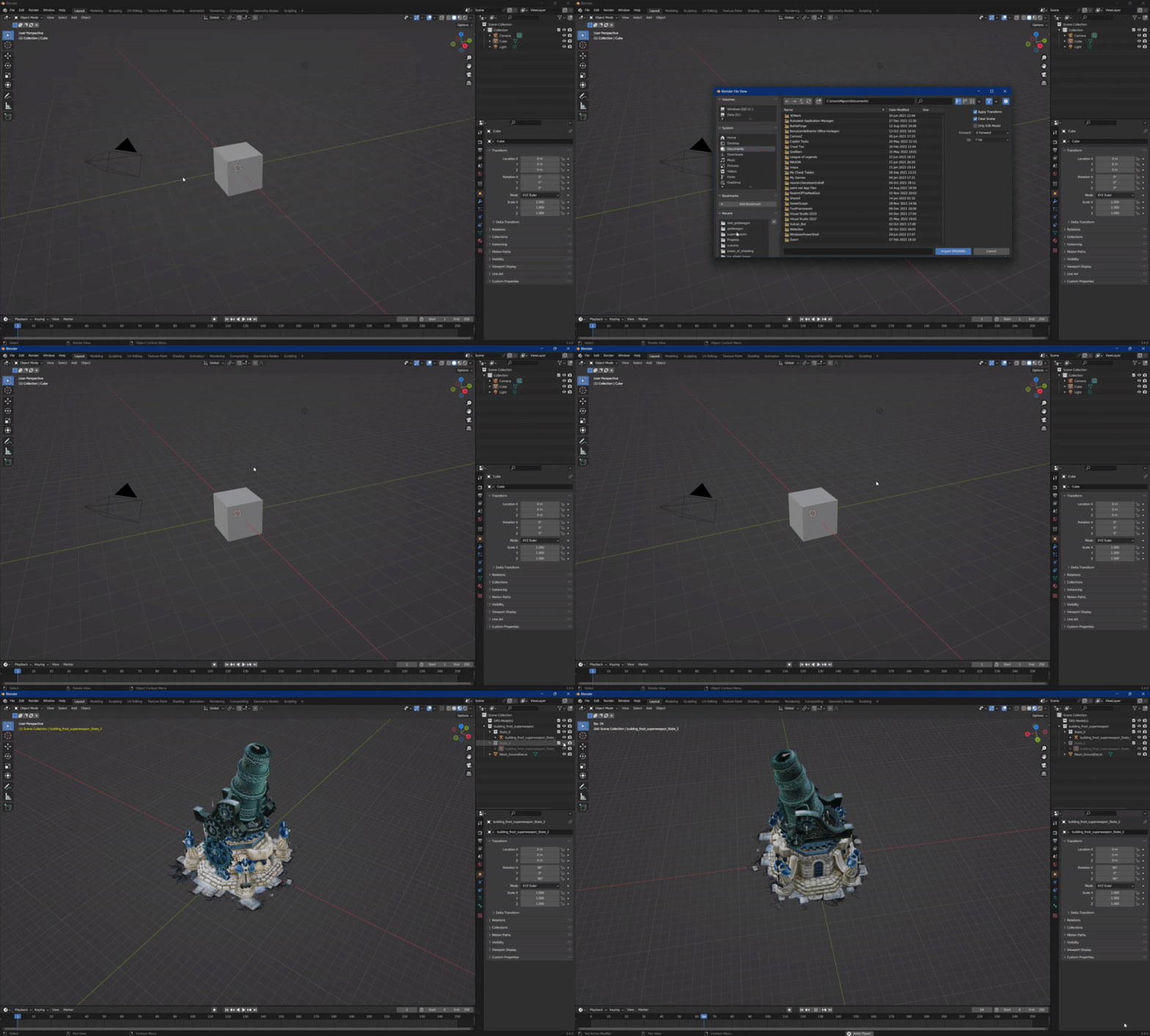
Demonstration of the Battleforge Model Importer for Blender in action:
- Bug fixing and stability for import/export and editor panels.
- Compatible with Blender
4.x;3.xmay work but is not a primary target.
Encountering issues or have suggestions?
Please report them by opening an issue on the GitHub repository.
This project uses a custom license: non-commercial use only, no modifications without consent, and redistribution of unmodified copies must keep notices intact. Format rights and game assets remain with their respective owners; see the license file for full terms.