Releases: HotCakeX/Harden-Windows-Security
Harden System Security v1.0.54.0

 HotCakeX
Violet Hansen
HotCakeX
Violet Hansen
What's New
-
You can now Repair and Reset every installed app in the "Manage Installed Apps" page.
-
Improved the "Manage Installed Apps" page's design by making the app group headers clickable so you can jump quickly to different groups of apps.
-
Fixed an issue in the "Manage Installed Apps" page's displayed selected count: #1144
-
In the "Manage Installed Apps" page, when an app uninstallation fails, the next app is attempted and the operation no longer stops. Also, there will be detailed logs generated containing the counts and names of the apps that were successfully uninstalled and failed. Completes the following request: #1145
-
Significantly Improved the multi app uninstallation performance in the "Manage Installed Apps" page.
How To Download

Harden System Security v1.0.53.0
HotCakeX
Violet Hansen
What's New
-
Added 2 new background customization options to the Settings page: "Custom Mica" and "Custom Blur". They offer you greater flexibility and freedom to customize the app's appearance. You can set a custom background image, apply blur effects on it and more. Animated GIFs also work so you can set a video/animated background for the app.
-
Updated dependencies to the latest version.
-
Improved the Group Policies Management page: search query will persist after retrieving data. Selected files on the Sidebar of the page can be viewed with right-click or tap + hold.
-
Added a new option to the Group Policies Management page to export the policies you see in the list view to JSON. It has CTRL + E keyboard shortcuts too.
-
Improved the way partition sizes are displayed in the Bootable Drive Maker page.
-
Added a new Security Measure to the Miscellaneous category which will set the Execution Policy of the Windows PowerShell to the most secure state which is "Restricted", completing the following feature request: #1140
-
When you right-click on the top/title bar of the app, you no longer see the legacy options, instead you'll see a modern flyout menu with Mica style. They are also fully localized so you will see the options in the language you select in the Harden System Security's settings page.
How To Download
AppControl Manager v2.0.710.0
HotCakeX
Violet Hansen
Installation
Install it from the Microsoft Store: https://apps.microsoft.com/detail/9png1jddtgp8
What's New
-
Improved policy creation from Event Logs for the WHQL File Publisher level. The analysis page now also shows the counts of WHQL signed files.
-
Added 2 new background customization options to the Settings page: "Custom Mica" and "Custom Blur". They offer you greater flexibility and freedom to customize the app's appearance. You can set a custom background image, apply blur effects on it and more. Animated GIFs also work so you can set a video/animated background for the app.
-
Updated dependencies to the latest version.
-
When you right-click on the top/title bar of the app, you no longer see the legacy options, instead you'll see a modern flyout menu with Mica style. They are also fully localized so you will see the options in the language you select in the AppControl Manager's settings page.
Harden System Security v1.0.52.0
HotCakeX
Violet Hansen
What's New
-
Updated dependencies to the latest versions.
-
Added Night Light toggle button and temperature adjustment slider to the sidebar.
-
Added "Apply" option to the right-click context menus in the Microsoft Security baseline and Microsoft 365 apps Security baseline pages. This means you can now apply the policies from any of the baselines selectively.
-
Improved page navigation performance.
-
You can now view the total count of the firewall rules in the firewall management page.
-
Improved the UI in the Firewall management page.
-
Do you often use the Microsoft Security baselines from your local files? Do you often use the app in offline environments? Your workflow has just got easier! Harden System Security app can now remember the paths of the Microsoft Security baseline files your browse for on your system. Now you only have to select them once and never have to do this twice. You can control this new behavior with a toggle switch that is available in the Baseline pages in the app.
-
Improved the Edge browser category: When all policies under the "TLSCipherSuiteDenyList" subkey are removed, the subkey itself will be removed as well so Edge won't think it's controlled by any organization anymore.
How To Download
AppControl Manager v2.0.709.0
HotCakeX
Violet Hansen
Installation
Install it from the Microsoft Store: https://apps.microsoft.com/detail/9png1jddtgp8
Introducing Data Analysis and new Dashboard in AppControl Manager
AppControl Manager can now analyze the App Control for Business (Code Integrity) and AppLocker data from Event Logs or Microsoft Defender for Endpoint (MDE) Advanced Hunting. This feature is available in the Event Logs Policy Creation and MDE Advanced Hunting pages. All of the data are localized so you can change the language in the app's settings page in order to view the data in your own language.
Data Summary
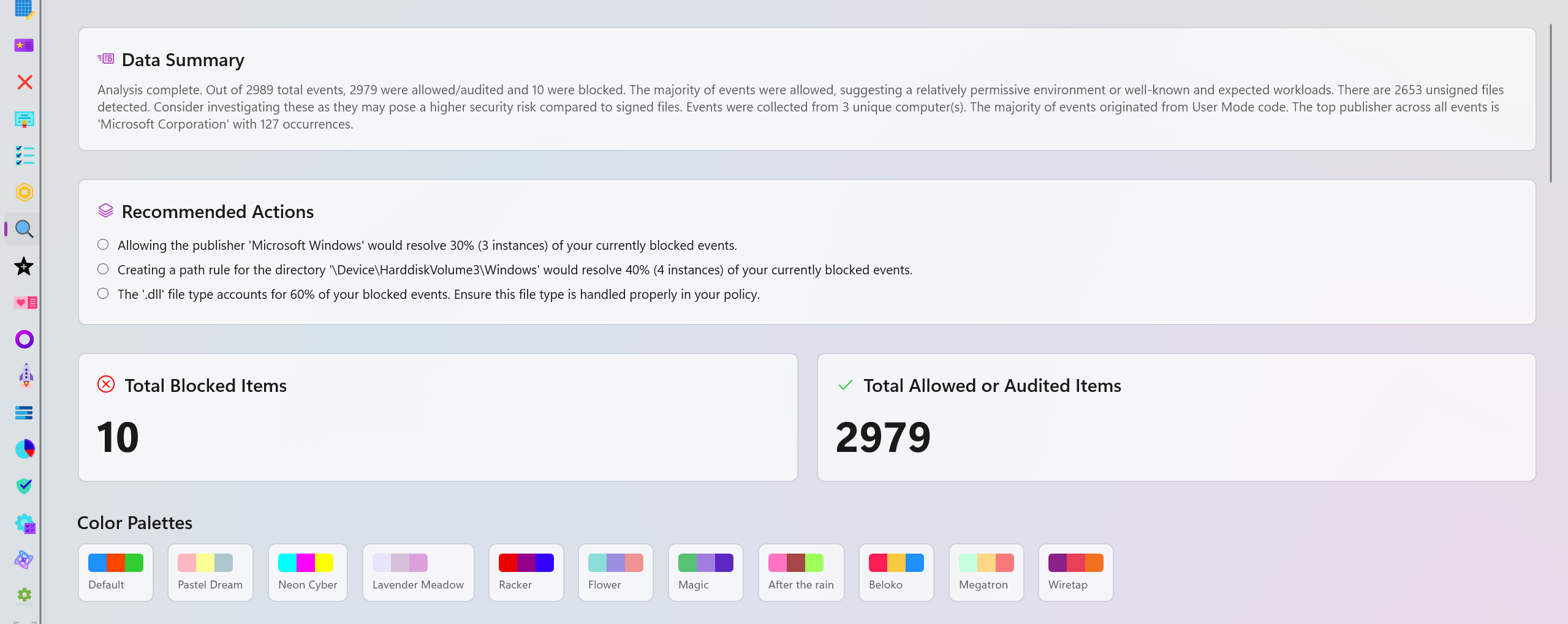
A brief overview of the available data and what they mean. It points out edge cases, provides easy to understand comparison of different data points and explains how the data is distributed in different categories.
Recommended Actions
This section will provide you with one or more recommendations based on your data. For instance, it can suggest specific policies to be deployed to resolve blocked items or recommend you to review certain parts of the logs because an excessive amount of blocked or audited events were detected in a short period of time.
Interactive Charts
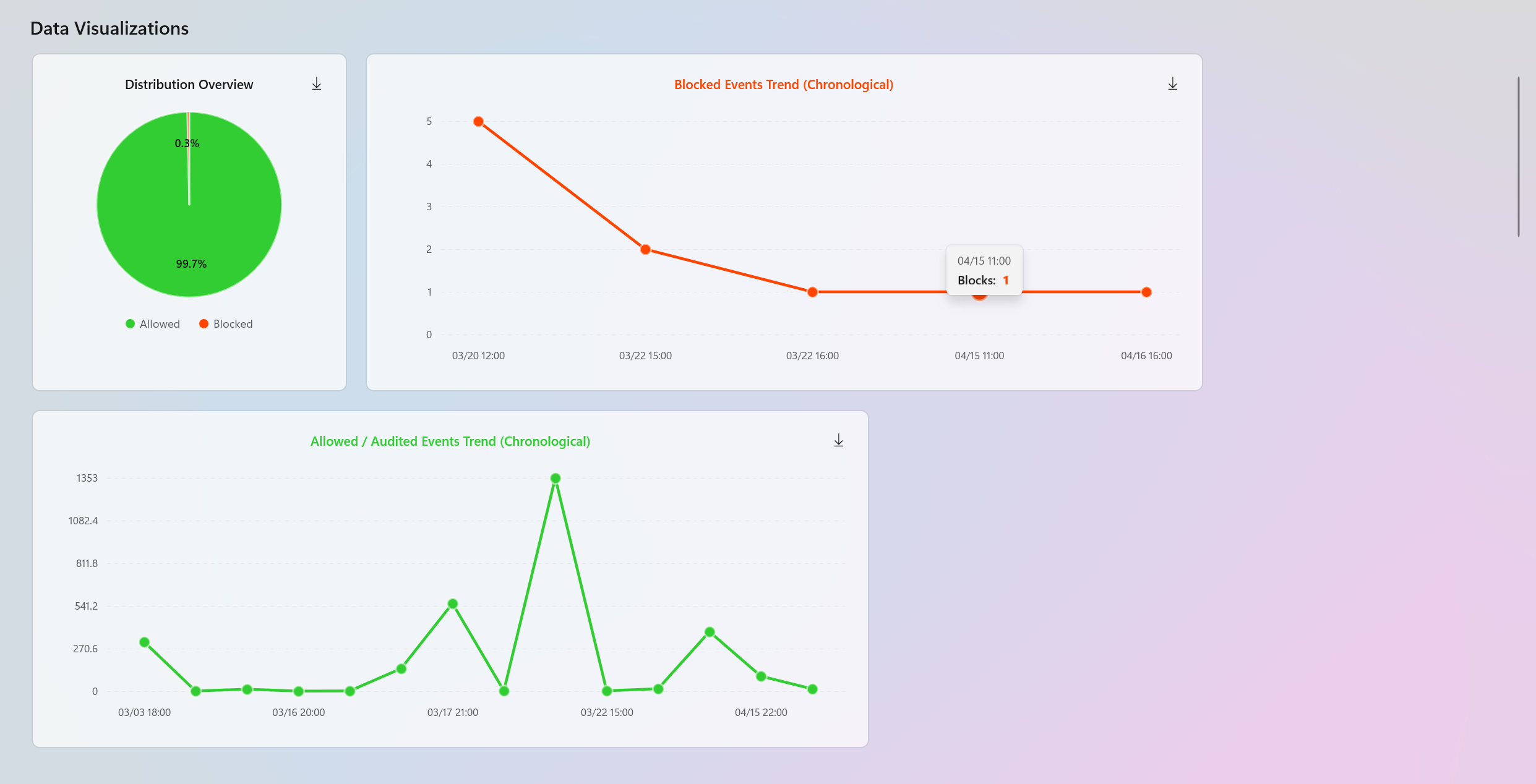
Interactive charts are dynamically generated to help with data visualization. You will have access to the entire blocked and audited/allowed trends in chronological order to quickly identify the peak points and detect anomalies. These charts have HotSpots where you can hover over or click to view additional information about specific points in time. You can also download these charts on your system as SVG files.
There is also a Pie chart displaying the distribution overview of the entire data set.
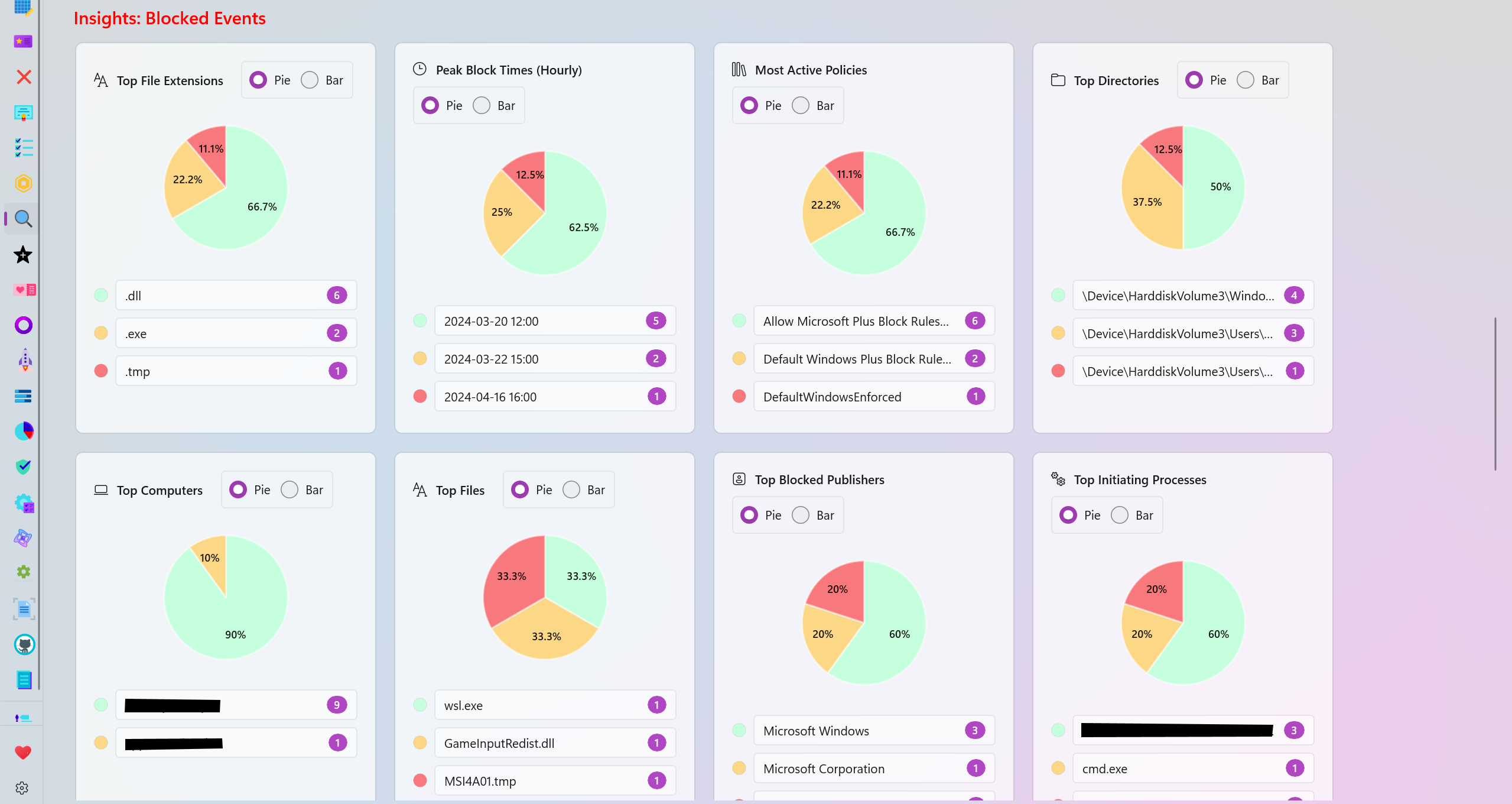
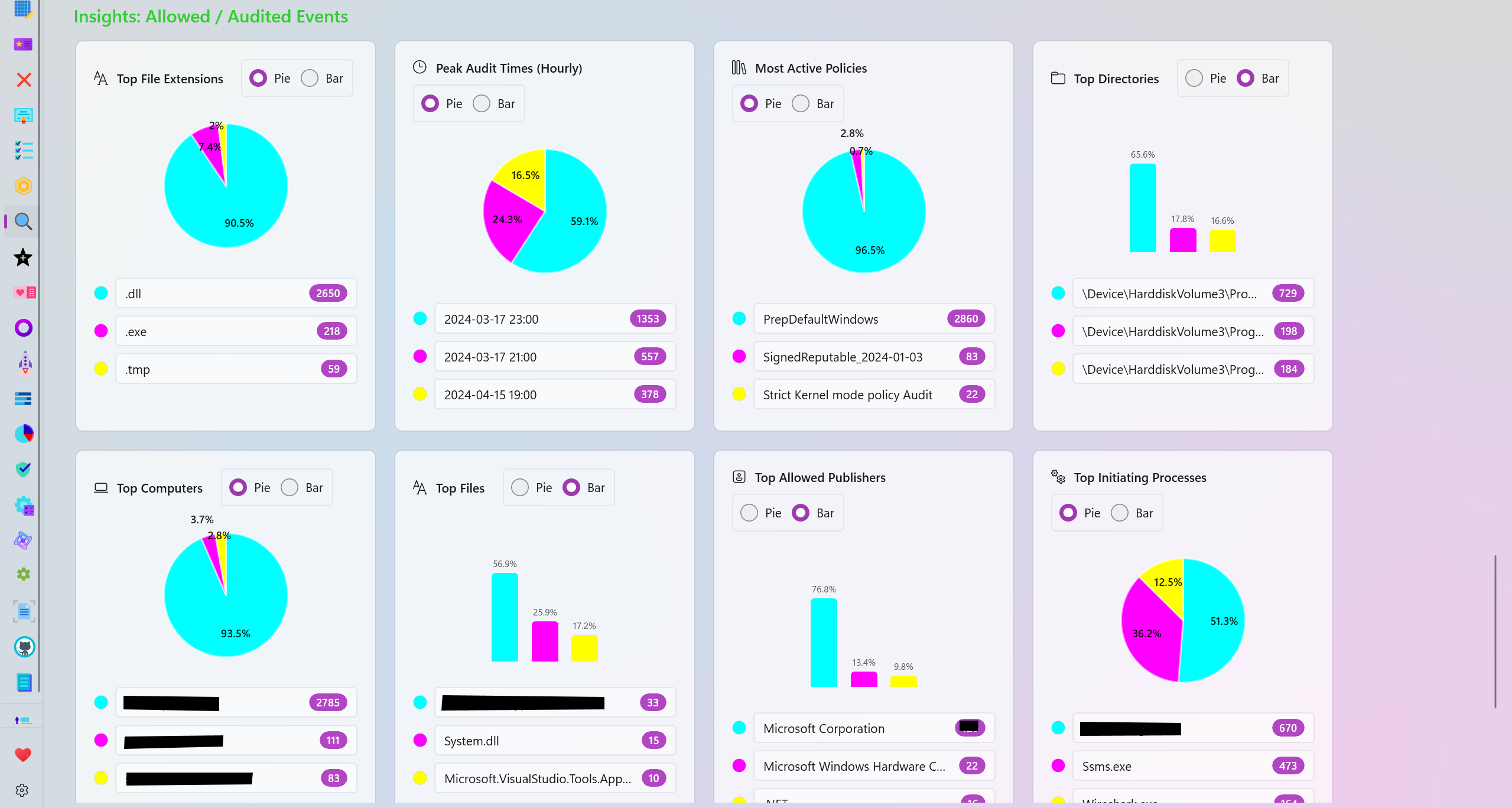
Audited and Blocked Insights
The analysis page generates many categories based on your data for further visualization of the blocked or allowed/audited data.
- Top File Extensions: View the top file extensions that were blocked or audited.
- Peak Block/Audit Times (Hourly): View the time frames where the most blocked or audited logs were generated.
- Most Active Policies: View the top most active policies responsible for generating the most blocked or audited logs.
- Top Directories: View the top directories where the most audited or blocked logs originate from.
- Top Computers: View the names of the top computers/systems that generated the most blocked or audited logs.
- Top Files: View the names of the top files that were blocked or audited the most.
- Top Publishers: View the names of the top file/program publishers that were audited or blocked the most.
- Top Initiating Processes: View the names of the processes that the most blocked or audited logs were initiated from.
- Top packaged Apps: View the top Package Family Names (PFNs) that were blocked or audited.
- Signing Scenario: View the distribution overview of the Signed vs Unsigned files among the blocked or audited logs.
Personalization
There are multiple color palettes to choose from in order to personalize the charts available in the analysis page. Each slice of a pie or each part of a bar chart can also be individually colorized to meet your needs.
Feedback
If you have any feedback or suggestions, please don't hesitate to create a new issue or discussion on this GitHub repository.
Completed the following feature request: #568
Harden System Security v1.0.51.0
HotCakeX
Violet Hansen
What's New
-
You can now change the display mode of the Sidebar pane and switch between Overlay or Inline modes.
-
The individual Apply/Verify/Remove buttons of each security measures have hover animations now.
-
The Harden System Security app now responds to the Windows theme/color changes if the app's theme in the settings page is set to "Use System Setting".
-
Various small UI and UX improvements.
-
You can now use CTRL + S keyboard shortcuts to open and close the Sidebar's pane.
How To Download
AppControl Manager v2.0.708.0
HotCakeX
Violet Hansen
Installation
Install it from the Microsoft Store: https://apps.microsoft.com/detail/9png1jddtgp8
What's New
-
You can now view the size of each policy in the Policies Library on the Sidebar.
-
You can now use CTRL + S keyboard shortcuts to open and close the Sidebar's pane.
-
You can now cancel the simulation process that you start in the Simulation page. The button has been changed to a cancellable version.
-
You can now cancel the event log scan that you start in the event logs page. The button has been changed to a cancellable version.
-
You can now duplicate a policy in the library by right-clicking on it and selecting "Duplicate Policy".
-
You can now detach policies you manually add to the sidebar policies library from their file paths so the changes made to them won't be written back to the original files.
-
Updated dependencies to the latest versions.
AppControl Manager v2.0.707.0
HotCakeX
Violet Hansen
Installation
Install it from the Microsoft Store: https://apps.microsoft.com/detail/9png1jddtgp8
What's New
-
You can now change the display mode of the Sidebar pane and switch between Overlay or Inline modes.
-
The AppControl Manager app now responds to the Windows theme/color changes if the app's theme in the settings page is set to "Use System Setting".
-
Added toggle buttons to the Policies Library on the Sidebar so you can choose to show/hide policies based on their types.
-
Added a new option in the Policies Library: Contextual Search. You can now click/tap on the magnifier icon in the Policies Library on the Sidebar to enable contextual search which allows you to not only search among the policies based on their names, types or IDs but also search through every detail that exists in them. This is quite useful when, for instance, you want to find out which policy in the Sidebar contains the hash of a particular file or which policy allows or blocks a particular app and other such scenarios.
-
Various small UI and UX improvements.
-
Improves policy creation and fixes the following issue: #1093
AppControl Manager v2.0.706.0
HotCakeX
Violet Hansen
Installation
Install it from the Microsoft Store: https://apps.microsoft.com/detail/9png1jddtgp8
What's New
-
Updated dependencies to the latest versions.
-
Added Toast Notifications for the AppControl Manager. Users can easily turn this feature off or on in the app's settings page. Whenever certain actions happen in the app such as policy creation or event logs retrieval and so on, a toast notification with a few details will be displayed in Windows notifying you about it.
-
Improved keyboard navigation and accessibility: You can now use arrow keys on your keyboard to navigate between the buttons on the toolbars of each page.
-
You can now press the ALT access key to reveal keyboard shortcuts on various user interface elements, helping with keyboard navigation and accessibility scenarios.
-
The System Information page is now available even if running as Standard user (unelevated). Only the "Online Policies" tab is available and the rest of the features in the page still require Administrator privileges.
Harden System Security v1.0.50.0
HotCakeX
Violet Hansen
What's New
-
Removed multiple dependencies by implementing them natively.
-
Reduced the app package size by over 20MBs.
-
Added a new backdrop option for the app called "Acrylic Thin", available in the app's settings page. This backdrop option provides a sleek and modern look to the app's interface, enhancing the overall user experience. It offers new options to further customize the Acrylic backdrop, such as controlling the tint color, tint opacity or luminosity opacity. You can view the changes you make to the Acrylic backdrop in real-time, allowing you to find the perfect settings for your preferences and your configurations will be saved for the next time you open the app.
-
Improved keyboard navigation and accessibility: You can now use arrow keys on your keyboard to navigate between the buttons on the toolbars of each page.
-
You can now press the ALT access key to reveal keyboard shortcuts on various user interface elements, helping with keyboard navigation and accessibility scenarios.
How To Download