A AI-powered macOS application that automatically solves GamePigeon's Word Hunt puzzles using computer vision and deep learning. Finds all possible words and swipes them for you.
World Record Achievement: This solver achieved the world record highest score of 362,000 points and the highest recorded score (captured on video) of 299,000 points.


Before installing, ensure you have:
- macOS Sonoma (15.0) or later - Required for iPhone Mirroring feature
- MacBook with iPhone Mirroring app enabled
- iPhone and MacBook logged into the same iCloud account - Required for iPhone Mirroring to work
- Screen Recording and Accessibility permissions - Will be set up during first launch
- AI-Powered Letter Recognition: Custom CNN model trained on thousands of letter images for accurate OCR
- Automatic Game Solving: Detects the board, finds all valid words, and swipes them automatically
- Real-Time Dashboard: Cocoa GUI showing board preview, word progress, and statistics
- Smart Word Finding: Uses Trie data structure for efficient word search across the 4×4 grid
- Calibration System: One-time calibration for perfect board detection accuracy
- Developer Tools: Scripts for dataset creation and model training
Watch the solver in action, achieving a 299,000 point score (highest recorded score on video):
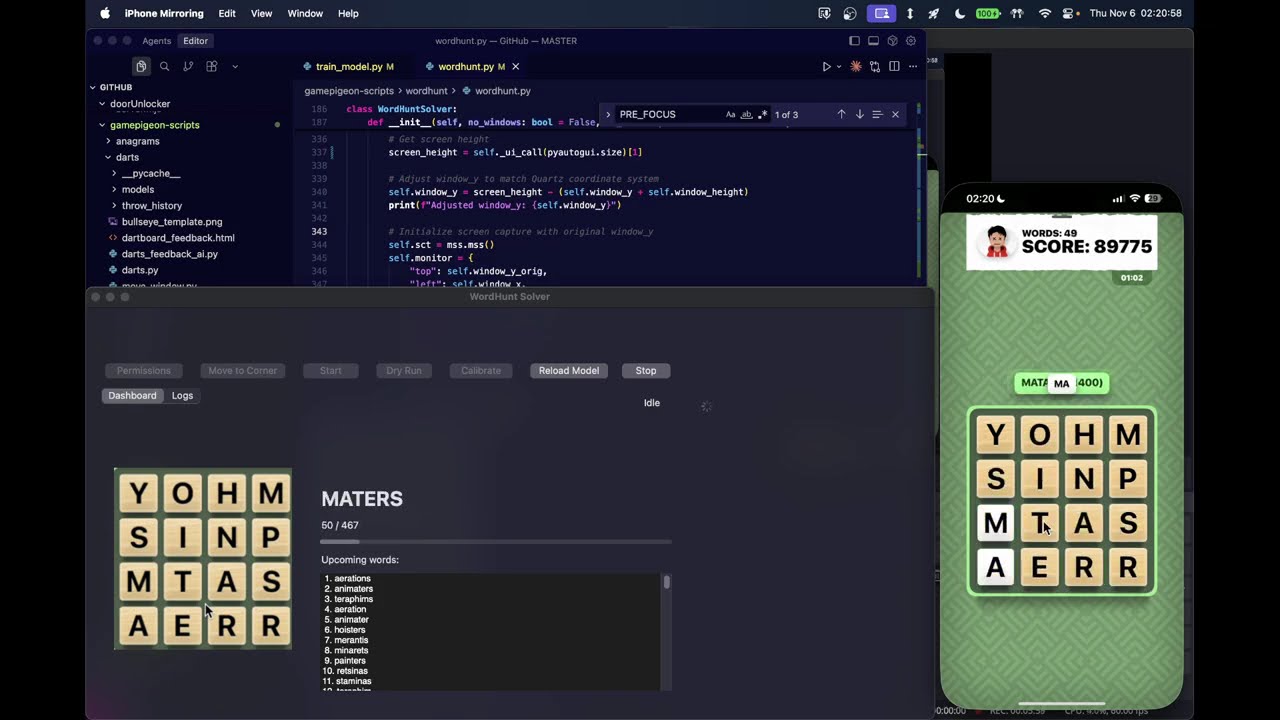
The solver captures the game board from iPhone Mirroring, recognizes letters using a trained CNN, finds all valid words using a Trie-based search, and automatically swipes them in optimal order. This implementation has achieved the world record highest score of 362,000 points.
┌─────────────────┐
│ iPhone Mirroring│
│   (Game Board)  │
└────────┬────────┘
         │ Screen Capture (mss)
         ▼
┌─────────────────┐
│  Board Detection│ ← OpenCV (green mask, contour detection)
│   (4×4 Grid)    │
└────────┬────────┘
         │ Extract Cells
         ▼
┌─────────────────┐
│ Letter Recognition│ ← CNN Model (PyTorch)
│   (A-Z, 26 classes)│
└────────┬────────┘
         │ Letters Array
         ▼
┌─────────────────┐
│  Word Finding    │ ← Trie + DFS Search
│  (All valid words)│
└────────┬────────┘
         │ Word List (sorted by length)
         ▼
┌─────────────────┐
│  Auto Swiping    │ ← Quartz CGEvent (mouse simulation)
│  (Input words)   │
└─────────────────┘
-
Board Detection (
wordhunt.py)- Uses OpenCV to detect the green game board background
- Applies morphological operations to find board contours
- Calculates precise 4×4 grid cell positions
- Supports calibration for improved accuracy
-
Letter Recognition (
wordhunt.py+letter_recognition_model.pth)- Custom CNN architecture (2 conv layers + 2 FC layers)
- Trained on 2,400+ labeled letter images
- Preprocesses cell images (grayscale, resize to 28×28, normalize)
- Returns letter predictions with confidence scores
-
Word Finding (
wordhunt.py)- Builds Trie from dictionary (handles 'QU' tiles correctly)
- Depth-first search across all 8 directions
- Validates words against dictionary
- Sorts by length (longest first) for maximum points
-
Automation (
wordhunt.py)- Uses Quartz CGEvent API for precise mouse control
- Calculates swipe paths through grid cells
- Handles coordinate system conversions (window ↔ screen ↔ Quartz)
- Respects game timing constraints (1:15 round limit)
-
GUI (
app_cocoa.py)- Native macOS Cocoa application
- Real-time board preview
- Word progress tracking
- Logs and diagnostics
The letter recognition model is a Convolutional Neural Network with the following structure:
Input: 28×28 grayscale image
  ↓
Conv2d(1 → 32, kernel=3) + ReLU
  ↓
MaxPool2d(2×2)
  ↓
Conv2d(32 → 64, kernel=3) + ReLU
  ↓
MaxPool2d(2×2)
  ↓
Flatten → Linear(64×5×5 → 128) + ReLU
  ↓
Dropout(0.5)
  ↓
Linear(128 → 26) + LogSoftmax
  ↓
Output: 26 classes (A-Z)
-
Dataset Creation (
create_dataset.py)- Captures game boards from iPhone Mirroring
- Extracts individual cell images
- Manual labeling interface with AI suggestions
- Deduplication by image hash
- Organizes images into
letter_dataset/A/,letter_dataset/B/, etc.
-
Model Training (
train_model.py)- 80/20 train/validation split
- Adam optimizer with CrossEntropyLoss
- Saves best model based on validation accuracy
- Provides per-letter diagnostics for problematic classes
- Typical training: 50-100 epochs
-
Model Performance
- Trained on 2,400+ labeled images
- High accuracy on letter recognition
- Handles various lighting conditions and board states
- Model file:
letter_recognition_model.pth(896 KB)
- Total Images: 2,407 labeled letter samples
- Distribution: Varies by letter frequency (E, A, R most common; Q, Z least common)
- Format: 28×28 grayscale PNG images
- Organization: One folder per letter (A-Z)
-
Download the latest release
- Go to the Releases page
- Download
WordHuntSolver-macOS.zipfrom the latest release
-
Extract and open the app
- Extract the ZIP file
- Double-click
WordHuntSolver.appto open it - macOS will show a security warning: "WordHuntSolver cannot be opened because the developer cannot be verified"
- Click Cancel
-
Trust and open the app
- Open System Settings → Privacy & Security
- Scroll down to find the message: "WordHuntSolver was blocked from use because it is not from an identified developer"
- Click Open Anyway next to the message
- Confirm by clicking Open in the dialog
-
Set up permissions
- When the app opens, click the "Permissions" button in the app
- This will open System Settings to the relevant privacy sections
- Enable Screen Recording permission
- Enable Accessibility permission
- You may need to restart the app after granting permissions
-
You're ready to go!
- Open iPhone Mirroring with Word Hunt game
- Click "Move to Corner" to position the window
- Send the Word Hunt text, and open it to the Start screen
- Click "Start" on the app to begin solving
-
Clone the repository
git clone https://github.com/Ammaar-Alam/wordhunt-solver.git cd wordhunt-solver -
Install dependencies
pip install -r requirements.txt
-
Run the application
python app_cocoa.py
-
Set up permissions
- Click the "Permissions" button in the app
- Enable Screen Recording and Accessibility permissions
- Restart the app if needed
-
Launch the app
- If installed from release: Open
WordHuntSolver.app - If installed from source: Run
python app_cocoa.py
- If installed from release: Open
-
Initial setup
- Click "Permissions" button to open System Settings
- Grant Screen Recording permission
- Grant Accessibility permission
- Restart the app if permissions were just granted
-
Prepare iPhone Mirroring
- Open iPhone Mirroring on your MacBook
- Open Word Hunt game on your iPhone
- Click "Move to Corner" in the app to position the iPhone Mirroring window
-
Calibration (Optional, recommended for first use)
- Click "Calibrate"
- Hover over center of top-left tile, wait for countdown
- Hover over center of bottom-right tile, wait for countdown
- Calibration is saved for future runs
-
Solve
- Send the Word Hunt text, and open it to the Start screen
- Click "Start" to begin solving
- Important: Once solving starts, the app takes control of your mouse. You will not be able to move your mouse manually while the solver is running.
- Watch the dashboard for progress
- Words are swiped automatically in optimal order
- To stop immediately: Press Escape (Esc) key at any time during solving to stop the solver and regain mouse control
# Interactive menu
python wordhunt.py menu

# Auto-solve (non-interactive)
python wordhunt.py solve

# Dry run (find words but don't swipe)
python wordhunt.py dry-run

# Calibration only
python wordhunt.py calibrate- Mouse Control: When solving starts, the app takes full control of your mouse. You cannot move your mouse manually while the solver is active.
- Stopping the Solver: Press Escape (Esc) key at any time to immediately stop solving and regain mouse control. You can also click the "Stop" button in the app.
- Keyboard Shortcuts:
⌘S- Start solving⌘.- Stop solvingEsc- Stop solving (works globally, even when app is not focused)
Use simulate_board.py to test word finding on a typed board:
python simulate_board.py --grid "dtio fors npat lfin" --limit 50The dataset creation tool (create_dataset.py) allows you to collect labeled letter images from game boards:
-
Start dataset creation
python create_dataset.py --suggest
-
Process boards
- Ensure iPhone Mirroring is open with Word Hunt game visible
- The tool captures the current board and extracts individual cell images
- For each cell, it displays the image and prompts for the letter label
- Use
--suggestflag to get AI predictions as starting point (press Enter to accept, or type the correct letter) - Type 'q' to quit the current board
-
Label cells
- Each cell image is shown in a window
- Enter the correct letter (A-Z) for each cell
- Images are automatically saved to
letter_dataset/<LETTER>/folders - Duplicate images are detected and skipped using content hashing
-
Continue with more boards
- After labeling all 16 cells, you'll be prompted to process another board
- Type 'y' to continue or 'n' to finish
- More boards provide better training data diversity
-
Dataset organization
- Images are saved as
letter_dataset/A/A_000001.png,letter_dataset/B/B_000001.png, etc. - Each letter folder contains all labeled images for that letter
- The tool maintains an index to avoid duplicate filenames
- Images are saved as
-
Train model
python train_model.py
- Automatically splits data into train/validation (80/20)
- Saves best model to
letter_recognition_model.pthbased on validation accuracy - Shows per-letter accuracy diagnostics to identify problematic classes
- Typical training: 50-100 epochs
-
Test model
- Run solver with new model
- Check accuracy on real boards
- Add more training data for problematic letters if needed
WordHunt-Solver/
├── app_cocoa.py              # Cocoa GUI application
├── wordhunt.py               # Core solver logic
├── train_model.py            # CNN training script
├── create_dataset.py         # Dataset creation tool
├── simulate_board.py         # Testing utility
├── letter_recognition_model.pth  # Trained CNN model
├── dictionary.txt            # Word dictionary
├── requirements.txt          # Python dependencies
├── setup.py                  # py2app configuration
├── Makefile                  # Build commands
└── WordHuntSolver.spec       # PyInstaller spec
wordhunt.py: Main solver class with board detection, OCR, word finding, and automationapp_cocoa.py: Native macOS GUI with real-time updatestrain_model.py: Model training with validation and diagnosticscreate_dataset.py: Interactive tool for labeling training dataletter_recognition_model.pth: Pre-trained PyTorch model weightsdictionary.txt: 477,000+ word dictionary for validation
The solver handles three coordinate systems:
- Window Coordinates: Top-left origin, relative to iPhone Mirroring window
- Screen Coordinates: Top-left origin, absolute screen position (pyautogui)
- Quartz Coordinates: Bottom-left origin, macOS native (CGEvent)
The solver converts between these systems for accurate mouse control.
- Crop image to likely board region (45%-85% of height)
- Convert to HSV color space
- Create green mask (H: 35-85, S: 40-255, V: 40-255)
- Apply morphological operations (close + open)
- Find largest contour (the board)
- Calculate grid cell positions from bounding box
- Optionally refine using tan tile detection
- Build Trie from dictionary (compresses 'qu' → 'q' for QU tiles)
- For each starting cell:
- Perform DFS in all 8 directions
- Track visited cells to avoid reuse
- Check Trie for valid word completions
- Sort results by length (descending), then alphabetically
- Calculate potential score using Word Hunt scoring rules
- 3 letters: 100 points
- 4 letters: 400 points
- 5 letters: 800 points
- 6 letters: 1,400 points
- 7 letters: 1,800 points
- 8 letters: 2,200 points
- 9+ letters: 2,600 + (length - 9) × 400 points
- Ensure iPhone Mirroring window is visible
- Check that game board is fully visible (not covered)
- Try calibration for better accuracy
- Adjust
WORDHUNT_MARGIN_*_RATIOenvironment variables
- Run calibration to improve board detection
- Check lighting conditions
- Train model with more data for problematic letters
- Use
--suggestflag in dataset creation to improve labeling
- Verify Accessibility permission is granted
- Check that iPhone Mirroring window is focused
- Ensure game is in active play state
- Try "Move to Corner" button to reposition window
- Ensure
letter_recognition_model.pthis in the same directory - Check file permissions
- Re-download from repository if missing
Contributions are welcome! Areas for improvement:
- Adding to the letter dataset: While the current model achieves high accuracy, additional labeled letter images can help improve edge cases and robustness. See the "Creating a Dataset" section above for instructions on how to add new training data.
- Support for different screen sizes/resolutions
- Performance optimizations
- Additional game modes
- Cross-platform support (Windows/Linux)
- Fork the repository
- Create a feature branch
- Make your changes
- Test thoroughly
- Submit a pull request
This project is licensed under the MIT License - see the LICENSE file for details.
Disclaimer: This tool is for educational purposes. Use responsibly and in accordance with GamePigeon's terms of service.
Note: This README was generated (entirely) with assistance from AI tools. While the technical information is accurate, please verify details against the source code and documentation.