




Forge SQL ORM Extra is the extended edition of forge-sql-orm — a TypeScript ORM for Atlassian Forge apps that use @forge/sql. It includes everything from the core package (Drizzle integration, migrations, local cache, optimistic locking, query analysis) and adds capabilities that need @forge/kvs or Rovo.
Use forge-sql-orm-extra instead of forge-sql-orm when you want a single import that covers both everyday Forge SQL work and the extras below. The public API is the same ForgeSQL class — extended methods sit alongside the core ones.
What extra adds on top of core:
| Capability | Core (forge-sql-orm) |
Extra (forge-sql-orm-extra) |
|---|---|---|
| Drizzle driver, migrations, CRUD, query analysis | ✅ | ✅ (included) |
| Level 1 local / in-memory cache (per invocation) | ✅ | ✅ (included) |
Level 2 global query cache via @forge/kvs |
— | ✅ selectCacheable*, executeCacheable, cache eviction helpers |
| Rovo natural-language analytics with RLS | — | ✅ forgeSQL.rovo() |
Install forge-sql-orm-extra when you need cross-invocation caching or Rovo. For Forge SQL apps without those features, forge-sql-orm alone is enough.
Core only (no global cache / Rovo):
npm install forge-sql-orm @forge/sql drizzle-orm -SWith global cache and Rovo (requires core dependencies in your app):
npm install forge-sql-orm-extra @forge/kvs -SYou still need forge-sql-orm, @forge/sql, and drizzle-orm in the project (install the core line above if they are not already present).
Weekly latest from GitHub Packages — same quality-gated snapshots as core README — Installing from GitHub Packages. Example:
npm install forge-sql-orm@npm:@forge-sql-orm/forge-sql-orm@latest \
  forge-sql-orm-extra@npm:@forge-sql-orm/forge-sql-orm-extra@latest \
@forge/kvs -S(forge-sql-orm-extra on GPR already depends on the matching weekly core build.)
import ForgeSQL from "forge-sql-orm-extra";

const forgeSQL = new ForgeSQL({
  cacheEntityName: "cache",
  cacheTTL: 300,
});

const users = await forgeSQL
  .selectCacheable({ id: users.id, name: users.name })
  .from(users)
  .where(eq(users.active, true));
const rovo = forgeSQL.rovo();
const settings = await rovo
.rovoSettingBuilder(usersTable, accountId)
.addContextParameter(":currentUserId", accountId)
.useRLS()
.addRlsColumn(usersTable.id)
.addRlsWherePart((alias) => `${alias}.${usersTable.id.name} = '${accountId}'`)
.finish()
.build();
const result = await rovo.dynamicIsolatedQuery(
"SELECT id, name FROM users WHERE status = 'active' AND userId = :currentUserId",
settings,
);- Setting Up Caching with @forge/kvs
- Choosing the Right Method - ForgeSQL ORM
- Choosing the Right Method - Direct Drizzle
- Global Cache System (Level 2)
- Rovo Integration
- ForgeSqlOrmOptions (cache)
To enable global caching, configure your Forge app manifest and ORM options (dependencies are covered in Installation above).
To use caching, you need to use Forge-SQL-ORM methods that support cache management:
Methods that perform cache eviction after execution and in cache context (batch eviction):
forgeSQL.insertAndEvictCache()forgeSQL.updateAndEvictCache()forgeSQL.deleteAndEvictCache()forgeSQL.modifyWithVersioningAndEvictCache()forgeSQL.getDrizzleQueryBuilder().insertAndEvictCache()forgeSQL.getDrizzleQueryBuilder().updateAndEvictCache()forgeSQL.getDrizzleQueryBuilder().deleteAndEvictCache()
Methods that participate in cache context only (batch eviction):
- All methods except the default Drizzle methods:
forgeSQL.insert()forgeSQL.update()forgeSQL.delete()forgeSQL.modifyWithVersioning()forgeSQL.getDrizzleQueryBuilder().insertWithCacheContext()forgeSQL.getDrizzleQueryBuilder().updateWithCacheContext()forgeSQL.getDrizzleQueryBuilder().deleteWithCacheContext()
Methods do not do evict cache, better do not use with cache feature:
forgeSQL.getDrizzleQueryBuilder().insert()forgeSQL.getDrizzleQueryBuilder().update()forgeSQL.getDrizzleQueryBuilder().delete()
Cacheable methods:
forgeSQL.selectCacheable()forgeSQL.selectDistinctCacheable()forgeSQL.getDrizzleQueryBuilder().selectAliasedCacheable()forgeSQL.getDrizzleQueryBuilder().selectAliasedDistinctCacheable()
Cache context example:
await forgeSQL.executeWithCacheContext(async () => {
  // These methods participate in batch cache clearing
  await forgeSQL.insert(Users).values(userData);
  await forgeSQL.update(Users).set(updateData).where(eq(Users.id, 1));
  await forgeSQL.delete(Users).where(eq(Users.id, 1));
  // Cache is cleared only once at the end for all affected tables
});
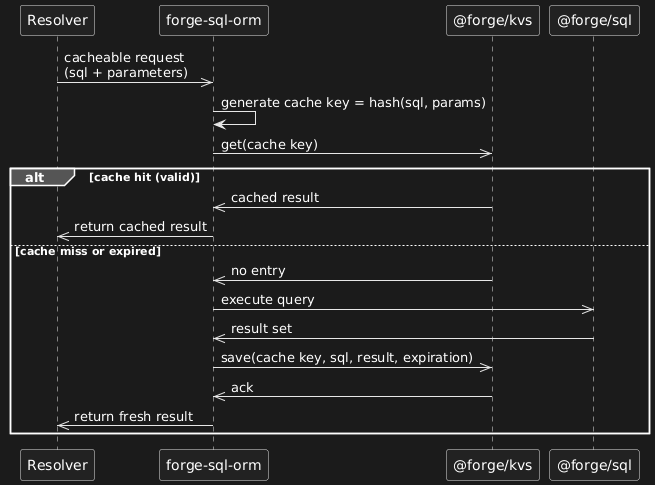
The diagram below shows the lifecycle of a cacheable query in Forge-SQL-ORM:
- Resolver calls forge-sql-orm with a SQL query and parameters.
- forge-sql-orm generates a cache key = hash(sql, parameters).
- It asks @forge/kvs for an existing cached result.
- Cache hit → result is returned immediately.
- Cache miss / expired → query is executed against @forge/sql.
- Fresh result is stored in @forge/kvs with TTL and returned to the caller.
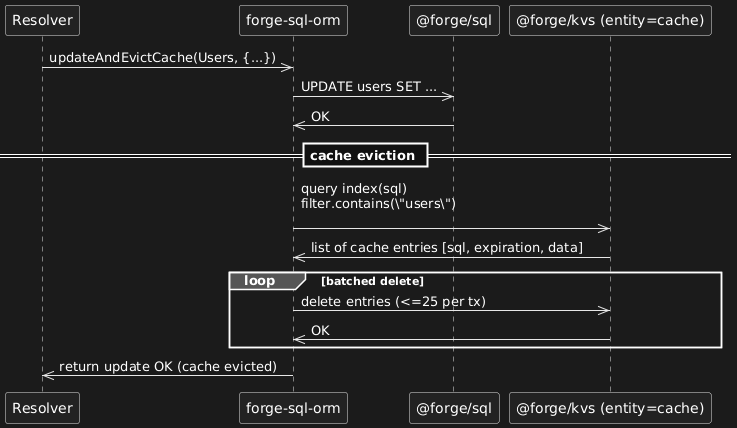
The diagram below shows how Evict Cache works in Forge-SQL-ORM:
- Data modification is executed through
@forge/sql(e.g.,UPDATE users ...). - After a successful update, forge-sql-orm queries the
cacheentity by using thesqlfield withfilter.contains("users")to find affected cached queries. - The returned cache entries are deleted in batches (up to 25 per transaction).
- Once eviction is complete, the update result is returned to the resolver.
- Note: Expired entries are not processed here — they are cleaned up separately by the scheduled cache cleanup trigger using the
expirationindex.
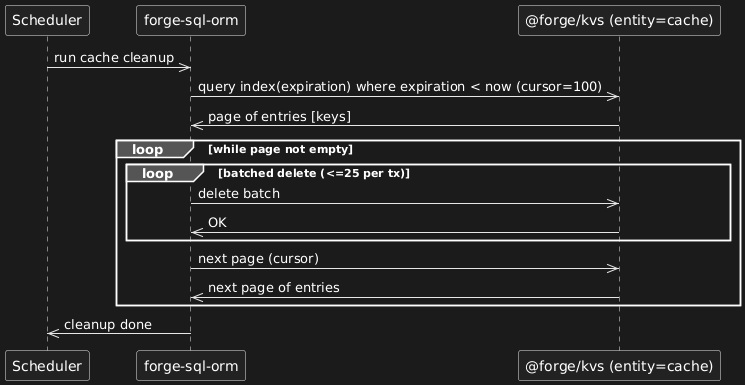
The diagram below shows how Scheduled Expiration Cleanup works:
Note: forge-sql-orm uses Forge KVS TTL feature ({ ttl: { unit: "SECONDS", value: number } }) to mark entries as expired. However, actual deletion is asynchronous and may take up to 48 hours. During this window, read operations may still return expired results. The scheduler trigger proactively cleans up expired entries to prevent cache growth from impacting INSERT/UPDATE performance.
- A periodic scheduler (Forge trigger) runs cache cleanup independently of data modifications.
- forge-sql-orm queries the cache entity by the expiration index to find entries with expiration < now.
- Entries are deleted in batches (up to 25 per transaction) until the page is empty; pagination is done with a cursor (e.g., 100 per page).
- This keeps the cache footprint small. Use this trigger only when needed; poor INSERT/UPDATE performance should be addressed by cache design first.
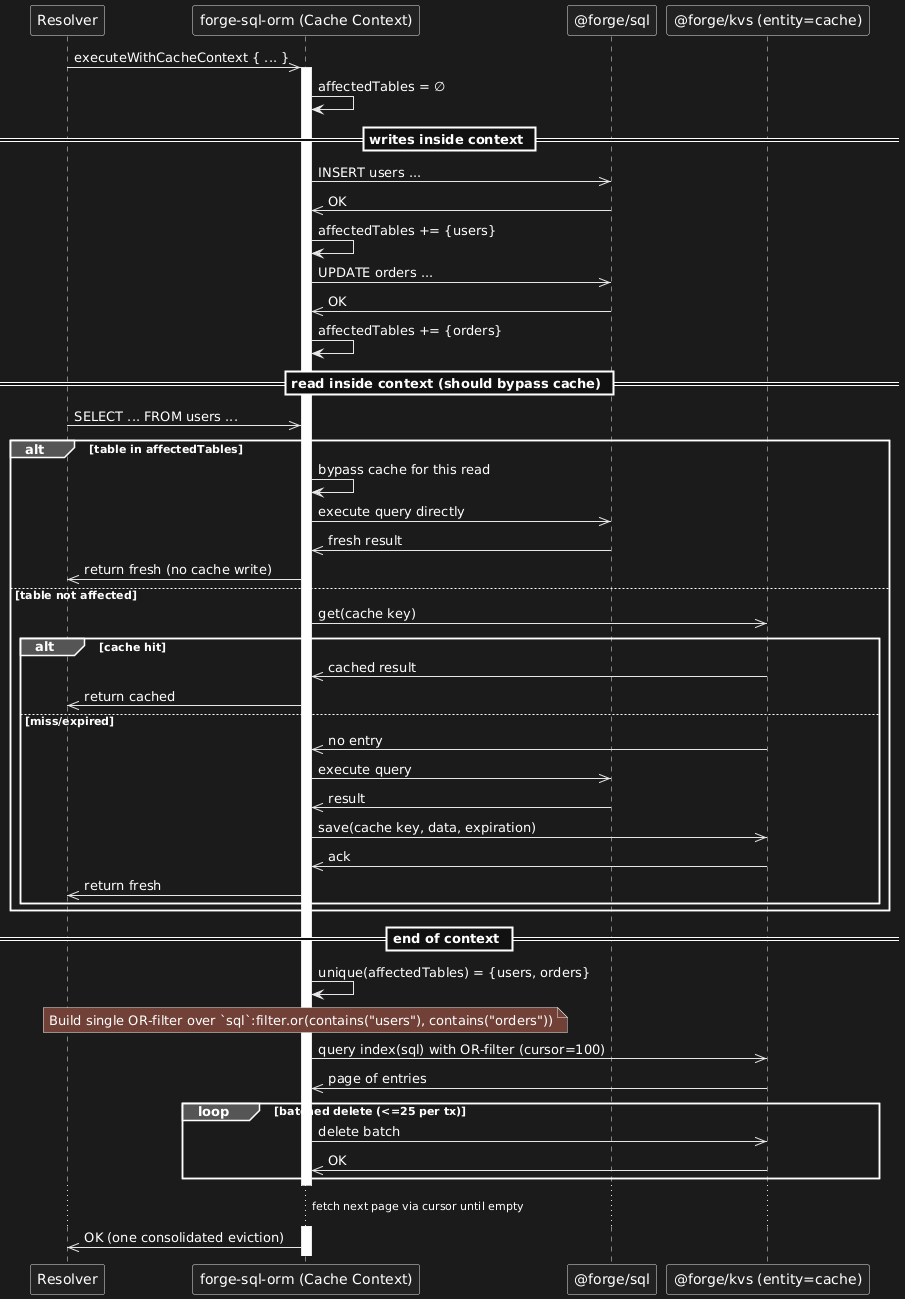
The diagram below shows how Cache Context works:
executeWithCacheContext(fn) lets you group multiple data modifications and perform one consolidated cache eviction at the end:
- The context starts with an empty
affectedTablesset. - Each successful
INSERT/UPDATE/DELETEinside the context registers its table name inaffectedTables. - Reads inside the same context that target tables present in
affectedTableswill bypass the cache (read-through to SQL) to avoid serving stale data. These reads also do not write back to cache until eviction completes. - On context completion,
affectedTablesis de-duplicated and used to build one combined KVS query over thesqlfield withfilter.or(filter.contains("<t1>"), filter.contains("<t2>"), ...), returning all impacted cache entries in a single scan (paged by cursor, e.g., 100/page). - Matching cache entries are deleted in batches (≤25 per transaction) until the page is exhausted; then the next page is fetched via the cursor.
- Expiration is handled separately by the scheduled cleanup and is not part of the context flow.
@forge/kvs Limits: Please review the official @forge/kvs quotas and limits before implementing caching.
TTL Limitations:
- Maximum TTL: The maximum supported TTL is 1 year from the time the expiry is set.
- Asynchronous deletion: Expired data is not removed immediately upon expiry. Deletion may take up to 48 hours. During this window, read operations may still return expired results.
- Performance impact: Slow INSERT/UPDATE is usually caused by misconfigured caching (over-caching, missing eviction, long TTL). Expired KVS entries can add overhead; the optional Clear Cache Scheduler Trigger is a last resort, not a substitute for correct cache usage.
Caching Guidelines:
- Don't cache everything - be selective about what to cache
- Don't cache simple and fast queries - sometimes direct query is faster than cache
- Consider data size and frequency of changes
- Monitor cache usage to stay within quotas
- Use appropriate TTL values
- Only if needed after fixing cache usage: optional Clear Cache Scheduler Trigger
- Table names starting with
a_: Tables whose names start witha_(case-insensitive) are automatically ignored in cache operations. KVS Cache will not work with such tables, and they will be excluded from cache invalidation and cache key generation.
Add the required storage.entities cache entity to your manifest.yml.
The scheduledTrigger for proactive cleanup of expired KVS entries is optional and usually not required. Noticeable INSERT/UPDATE slowdown is primarily a sign of incorrect cache usage (caching too much, wrong TTL, missing eviction on writes, not using cache context, etc.) — fix that first. Consider the scheduler only as an extra safeguard if you still see degradation after reviewing cache design, not as a default requirement.
modules:
  storage:
    entities:
      - name: cache
        attributes:
          sql:
            type: string
          expiration:
            type: integer
          data:
            type: string
        indexes:
          - sql
          - expiration
  sql:
    - key: main
      engine: mysql
Optional — add only if you still need proactive expiry cleanup after fixing cache usage:
scheduledTrigger:
  - key: clear-cache-trigger
    function: clearCache
    interval: fiveMinute
function:
  - key: clearCache
    handler: index.clearCache
// Only if you added scheduledTrigger in manifest.yml
import { clearCacheSchedulerTrigger } from "forge-sql-orm-extra";
export const clearCache = () => {
return clearCacheSchedulerTrigger({
cacheEntityName: "cache",
});
};Set the cache entity name in your ForgeSQL configuration:
import ForgeSQL from "forge-sql-orm-extra";

const options = {
  cacheEntityName: "cache", // Must match the entity name in manifest.yml
  cacheTTL: 300, // Default cache TTL in seconds (5 minutes)
  cacheWrapTable: true, // Wrap table names with backticks in cache keys
  // ... other options
};

const forgeSQL = new ForgeSQL(options);
Important Notes:
- The
cacheEntityNamemust exactly match thenamein your manifest storage entities - The entity attributes (
sql,expiration,data) are required for proper cache functionality - Indexes on
sqlandexpirationimprove cache lookup performance - Cache data uses Forge KVS TTL for expiration (deletion is asynchronous, may take up to 48 hours)
- No additional permissions are required beyond standard Forge app permissions
package.json:
npm install forge-sql-orm forge-sql-orm-extra @forge/sql @forge/kvs drizzle-orm -Smanifest.yml:
modules:
  sql:
    - key: main
      engine: mysql
manifest.yml:
modules:
  # Optional scheduler — see Step 1 note
  scheduledTrigger:
    - key: clear-cache-trigger
      function: clearCache
      interval: fiveMinute
  storage:
    entities:
      - name: cache
        attributes:
          sql:
            type: string
          expiration:
            type: integer
          data:
            type: string
        indexes:
          - sql
          - expiration
  sql:
    - key: main
      engine: mysql
  function:
    - key: clearCache
      handler: index.clearCache
index.ts:
import ForgeSQL from "forge-sql-orm-extra";

import { clearCacheSchedulerTrigger } from "forge-sql-orm-extra";
import { getTableColumns } from "drizzle-orm";

const forgeSQL = new ForgeSQL({
  cacheEntityName: "cache",
});

export const clearCache = () => {
  return clearCacheSchedulerTrigger({
    cacheEntityName: "cache",
  });
};

// simple insert
await forgeSQL.insert(Users, [userData]);
// Use versioned operations without caching
await forgeSQL.modifyWithVersioning().insert(Users, [userData]);
const users = await forgeSQL.select({ id: Users.id });

// Now you can use caching features
const usersData = await forgeSQL
  .selectCacheable(getTableColumns(users))
  .from(users)
  .where(eq(users.active, true));

// simple insert
await forgeSQL.insertAndEvictCache(users, [userData]);
// Use versioned operations with caching
await forgeSQL.modifyWithVersioningAndEvictCache().insert(users, [userData]);

// use Cache Context
const data = await forgeSQL.executeWithCacheContextAndReturnValue(async () => {
  // after insert mark users to evict
  await forgeSQL.insert(users, [userData]);
  // after insertAndEvictCache mark orders to evict
  await forgeSQL.insertAndEvictCache(orders, [order1, order2]);
  // execute query and put result to local cache
  await forgeSQL
    .selectCacheable({
      userId: users.id,
      userName: users.name,
      orderId: orders.id,
      orderName: orders.name,
    })
    .from(users)
    .innerJoin(orders, eq(orders.userId, users.id))
    .where(eq(users.active, true));
  // use local cache without @forge/kvs and @forge/sql
  return await forgeSQL
    .selectCacheable({
      userId: users.id,
      userName: users.name,
      orderId: orders.id,
      orderName: orders.name,
    })
    .from(users)
    .innerJoin(orders, eq(orders.userId, users.id))
    .where(eq(users.active, true));
});
// execute query and put result to kvs cache
await forgeSQL
  .selectCacheable({
    userId: users.id,
    userName: users.name,
    orderId: orders.id,
    orderName: orders.name,
  })
  .from(users)
  .innerJoin(orders, eq(orders.userId, users.id))
  .where(eq(users.active, true));

// get result from @foge/kvs cache without real @forge/sql call
await forgeSQL
  .selectCacheable({
    userId: users.id,
    userName: users.name,
    orderId: orders.id,
    orderName: orders.name,
  })
  .from(users)
  .innerJoin(orders, eq(orders.userId, users.id))
  .where(eq(users.active, true));

// use Local Cache for performance optimization
const optimizedData = await forgeSQL.executeWithLocalCacheContextAndReturnValue(async () => {
  // First query - hits database and caches result
  const users = await forgeSQL
    .select({ id: users.id, name: users.name })
    .from(users)
    .where(eq(users.active, true));

  // Second query - uses local cache (no database call)
  const cachedUsers = await forgeSQL
    .select({ id: users.id, name: users.name })
    .from(users)
    .where(eq(users.active, true));

  // Using new methods for better performance
  const usersFrom = await forgeSQL.selectFrom(users).where(eq(users.active, true));

  // This will use local cache (no database call)
  const cachedUsersFrom = await forgeSQL.selectFrom(users).where(eq(users.active, true));

  // Raw SQL with local caching
  const rawUsers = await forgeSQL.execute("SELECT id, name FROM users WHERE active = ?", [true]);

  // Insert operation - evicts local cache
  await forgeSQL.insert(users).values({ name: "New User", active: true });

  // Third query - hits database again and caches new result
  const updatedUsers = await forgeSQL
    .select({ id: users.id, name: users.name })
    .from(users)
    .where(eq(users.active, true));

  return { users, cachedUsers, updatedUsers, usersFrom, cachedUsersFrom, rawUsers };
});| Method | Use Case | Versioning | Cache Management |
|---|---|---|---|
modifyWithVersioningAndEvictCache() |
High-concurrency scenarios with Cache support | ✅ Yes | ✅ Yes |
modifyWithVersioning() |
High-concurrency scenarios | ✅ Yes | Cache Context |
insertAndEvictCache() |
Simple inserts | ❌ No | ✅ Yes |
updateAndEvictCache() |
Simple updates | ❌ No | ✅ Yes |
deleteAndEvictCache() |
Simple deletes | ❌ No | ✅ Yes |
insert/update/delete |
Basic Drizzle operations | ❌ No | Cache Context |
selectFrom() |
All-column queries with field aliasing | ❌ No | Local Cache |
selectDistinctFrom() |
Distinct all-column queries with field aliasing | ❌ No | Local Cache |
selectCacheableFrom() |
All-column queries with field aliasing and caching | ❌ No | Local + Global Cache |
selectDistinctCacheableFrom() |
Distinct all-column queries with field aliasing and caching | ❌ No | Local + Global Cache |
execute() |
Raw SQL queries with local caching | ❌ No | Local Cache |
executeCacheable() |
Raw SQL queries with local and global caching | ❌ No | Local + Global Cache |
executeDDL() |
DDL operations (CREATE, ALTER, DROP, etc.) | ❌ No | No Caching |
executeDDLActions() |
Execute regular SQL queries in DDL operation context | ❌ No | No Caching |
with() |
Common Table Expressions (CTEs) | ❌ No | Local Cache |
| Method | Use Case | Versioning | Cache Management |
|---|---|---|---|
insertWithCacheContext/insertWithCacheContext/updateWithCacheContext |
Basic Drizzle operations | ❌ No | Cache Context |
insertAndEvictCache() |
Simple inserts without conflicts | ❌ No | ✅ Yes |
updateAndEvictCache() |
Simple updates without conflicts | ❌ No | ✅ Yes |
deleteAndEvictCache() |
Simple deletes without conflicts | ❌ No | ✅ Yes |
insert/update/delete |
Basic Drizzle operations | ❌ No | ❌ No |
selectFrom() |
All-column queries with field aliasing | ❌ No | Local Cache |
selectDistinctFrom() |
Distinct all-column queries with field aliasing | ❌ No | Local Cache |
selectCacheableFrom() |
All-column queries with field aliasing and caching | ❌ No | Local + Global Cache |
selectDistinctCacheableFrom() |
Distinct all-column queries with field aliasing and caching | ❌ No | Local + Global Cache |
execute() |
Raw SQL queries with local caching | ❌ No | Local Cache |
executeCacheable() |
Raw SQL queries with local and global caching | ❌ No | Local + Global Cache |
executeWithMetadata() |
Resolver-level profiling with execution metrics and configurable query plan printing (TopSlowest or SummaryTable mode) | ❌ No | Local Cache |
executeDDL() |
DDL operations (CREATE, ALTER, DROP, etc.) | ❌ No | No Caching |
executeDDLActions() |
Execute regular SQL queries in DDL operation context | ❌ No | No Caching |
with() |
Common Table Expressions (CTEs) | ❌ No | Local Cache |
where Cache context - allows you to batch cache invalidation events and bypass cache reads for affected tables.
This section documents Level 2 only (moved to forge-sql-orm-extra). Level 1 (local cache) is documented below and in the core README; it does not require @forge/kvs.
forge-sql-orm-extra provides a global caching system that provides cross-invocation caching - the ability to share cached data between different resolver invocations. The global cache system is built on top of @forge/kvs Custom entity store and provides persistent cross-invocation caching with automatic serialization/deserialization of complex data structures.
When using forge-sql-orm-extra, both levels are available:
- Level 1 (Local Cache) — implemented in forge-sql-orm (core); unchanged in 2.2.x. Same APIs with
import ForgeSQL from "forge-sql-orm"or"forge-sql-orm-extra". - Level 2 (Global Cache) — forge-sql-orm-extra only (
@forge/kvs,selectCacheable*, …). Coreforge-sql-ormusesNopCacheand does not persist L2.
Lookup order: L1 (memory) → L2 (KVS, if configured) → database.
The caching system uses Atlassian Forge's Custom entity store to persist cache data. Each cache entry is stored as a custom entity with TTL management via Forge KVS. Note that expired data deletion is asynchronous and may take up to 48 hours. An optional Clear Cache Scheduler Trigger can remove expired entries proactively; it is not required for typical setups.
Default backends differ by package:
| Package | Default cacheImplementation |
Global KVS cache |
|---|---|---|
forge-sql-orm (core) |
new NopCache() |
Off — cacheable methods do not persist to KVS |
forge-sql-orm-extra |
new KVSCache() |
On — same behavior as the former monolith with cache |
If you used global cache before (2.1.x monolith): install and import forge-sql-orm-extra instead of forge-sql-orm. You do not need to change cacheEntityName, TTL, or query code — only the import (and dependencies). KVSCache is already the default on this package.
The backend is still pluggable via cacheImplementation (Cache interface from core). Override only for custom implementations or tests:
import ForgeSQL from "forge-sql-orm-extra";
import { KVSCache } from "forge-sql-orm-extra";

const forgeSQL = new ForgeSQL({
  cacheEntityName: "cache", // Must match manifest storage entity
  cacheTTL: 300,
  cacheWrapTable: true,
  // Optional — default on forge-sql-orm-extra is already new KVSCache()
  cacheImplementation: new KVSCache(),
  additionalMetadata: {
    users: {
      tableName: "users",
      versionField: { fieldName: "updatedAt" },
    },
  },
});
Do not use
forge-sql-ormfor global cache. Core intentionally defaults toNopCache(). To turn off KVS caching while still importing extra (unusual), useimport { NopCache } from "forge-sql-orm"andcacheImplementation: new NopCache().
The caching system leverages Forge's Custom entity store to provide:
- Persistent Storage: Cache data survives app restarts and deployments
- TTL Support: Uses Forge KVS TTL feature for expiration (deletion is asynchronous, may take up to 48 hours)
- Efficient Retrieval: Fast key-based lookups using Forge's optimized storage
- Data Serialization: Automatic handling of complex objects and query results
- Batch Operations: Efficient bulk cache operations for better performance
// Cache entries are stored as custom entities in Forge's KVS
// Example cache key structure:
// Key: "CachedQuery_8d74bdd9d85064b72fb2ee072ca948e5"
// Value: { data: [...], expiration: 1234567890, sql: "select * from 1" }The cache context allows you to batch cache invalidation events and bypass cache reads for affected tables:
// Execute operations within a cache context
await forgeSQL.executeWithCacheContext(async () => {
  // All cache invalidation events are collected and executed in batch
  await forgeSQL.modifyWithVersioningAndEvictCache().insert(Users, [userData]);
  await forgeSQL.modifyWithVersioningAndEvictCache().updateById(updateData, Users);
  // Cache is cleared only once at the end for all affected tables
});

// Execute with return value
const result = await forgeSQL.executeWithCacheContextAndReturnValue(async () => {
  const user = await forgeSQL.modifyWithVersioningAndEvictCache().insert(Users, [userData]);
  return user;
});

// Basic operations also participate in cache context
await forgeSQL.executeWithCacheContext(async () => {
  // These operations will participate in batch cache clearing
  await forgeSQL.insert(Users).values(userData);
  await forgeSQL.update(Users).set(updateData).where(eq(Users.id, 1));
  await forgeSQL.delete(Users).where(eq(Users.id, 1));
  // Cache is cleared only once at the end for all affected tables
});Package note: Local cache is core functionality (forge-sql-orm); it did not move to extra. This section describes L1 for apps using forge-sql-orm-extra (L1 + L2). For L1 only, use core
forge-sql-ormwithout@forge/kvs.
Forge-SQL-ORM provides a local cache system (Level 1 cache) that stores query results in memory for the duration of a single resolver invocation. This is particularly useful for optimizing repeated queries within the same execution context(resolver invocation).
Local cache is an in-memory caching layer that operates within a single resolver invocation scope. Unlike the global KVS cache, local cache:
- Stores data in memory using Node.js
AsyncLocalStorage - Automatically clears when the invocation completes (Resolver call)
- Provides instant access to previously executed queries in resolver invocation
- Reduces database load for repeated operations within the same invocation
- Works alongside the global KVS cache system
- In-Memory Storage: Query results are cached in memory using Node.js
AsyncLocalStorage - Invocation-Scoped: Cache is automatically cleared when the invocation completes
- Automatic Eviction: Cache is cleared when insert/update/delete operations are performed
- No Persistence: Data is not stored between Invocations (unlike global KVS cache)
- Performance Optimization: Reduces database queries for repeated operations
- Simple Configuration: Works out of the box with simple setup
// Execute operations within a local cache context
await forgeSQL.executeWithLocalContext(async () => {
  // First call - executes query and caches result
  const users = await forgeSQL
    .select({ id: users.id, name: users.name })
    .from(users)
    .where(eq(users.active, true));

  // Second call - gets result from local cache (no database query)
  const cachedUsers = await forgeSQL
    .select({ id: users.id, name: users.name })
    .from(users)
    .where(eq(users.active, true));

  // Using new selectFrom methods with local caching
  const usersFrom = await forgeSQL.selectFrom(users).where(eq(users.active, true));

  // This will use local cache (no database call)
  const cachedUsersFrom = await forgeSQL.selectFrom(users).where(eq(users.active, true));

  // Using execute() with local caching
  const rawUsers = await forgeSQL.execute("SELECT id, name FROM users WHERE active = ?", [true]);

  // This will use local cache (no database call)
  const cachedRawUsers = await forgeSQL.execute("SELECT id, name FROM users WHERE active = ?", [
    true,
  ]);

  // Raw SQL with execution metadata and performance monitoring
  const usersWithMetadata = await forgeSQL.executeWithMetadata(
    async () => {
      const users = await forgeSQL.selectFrom(usersTable);
      const orders = await forgeSQL
        .selectFrom(ordersTable)
        .where(eq(ordersTable.userId, usersTable.id));
      return { users, orders };
    },
    (totalDbExecutionTime, totalResponseSize, printQueriesWithPlan) => {
      const threshold = 500; // ms baseline for this resolver

      if (totalDbExecutionTime > threshold * 1.5) {
        console.warn(`[Performance Warning] Resolver exceeded DB time: ${totalDbExecutionTime} ms`);
        await printQueriesWithPlan(); // Analyze and print query execution plans
      } else if (totalDbExecutionTime > threshold) {
        console.debug(`[Performance Debug] High DB time: ${totalDbExecutionTime} ms`);
      }

      console.log(`DB response size: ${totalResponseSize} bytes`);
    },
    {
      // Optional: Configure query plan printing
      topQueries: 1, // Print top slowest query (default)
      mode: "TopSlowest", // Print top slowest queries (default)
    },
  );

  // Insert operation - evicts local cache for users table
  await forgeSQL.insert(users).values({ name: "New User", active: true });

  // Third call - executes query again and caches new result
  const updatedUsers = await forgeSQL
    .select({ id: users.id, name: users.name })
    .from(users)
    .where(eq(users.active, true));
});

// Execute with return value
const result = await forgeSQL.executeWithLocalCacheContextAndReturnValue(async () => {
  // First call - executes query and caches result
  const users = await forgeSQL
    .select({ id: users.id, name: users.name })
    .from(users)
    .where(eq(users.active, true));

  // Second call - gets result from local cache (no database query)
  const cachedUsers = await forgeSQL
    .select({ id: users.id, name: users.name })
    .from(users)
    .where(eq(users.active, true));

  return { users, cachedUsers };
});// Atlassian forge resolver with local cache optimization
const userResolver = async (req) => {
return await forgeSQL.executeWithLocalCacheContextAndReturnValue(async () => {
// Get user details using selectFrom (all columns with field aliasing)
const user = await forgeSQL.selectFrom(users).where(eq(users.id, args.userId));
// Get user's orders using selectCacheableFrom (with caching)
const orders = await forgeSQL.selectCacheableFrom(orders).where(eq(orders.userId, args.userId));
// Get user's profile using raw SQL with execute()
const profile = await forgeSQL.execute(
"SELECT id, bio, avatar FROM profiles WHERE user_id = ?",
[args.userId],
);
// Get user statistics using complex raw SQL
const stats = await forgeSQL.execute(
`
SELECT
COUNT(o.id) as total_orders,
SUM(o.amount) as total_spent,
AVG(o.amount) as avg_order_value
FROM orders o
WHERE o.user_id = ? AND o.status = 'completed'
`,
[args.userId],
);
// If any of these queries are repeated within the same resolver,
// they will use the local cache instead of hitting the database
return {
...user[0],
orders,
profile: profile[0],
stats: stats[0],
};
});
};| Feature | Local Cache (Level 1) | Global Cache (Level 2) |
|---|---|---|
| Storage | In-memory (Node.js process) | Persistent (KVS Custom Entities) |
| Scope | Single forge invocation | Cross-invocation (between calls) |
| Persistence | No (cleared on invocation end) | Yes (survives app redeploy) |
| Performance | Very fast (memory access) | Fast (KVS optimized storage) |
| Memory Usage | Low (invocation-scoped) | Higher (persistent storage) |
| Use Case | Invocation optimization | Cross-invocation data sharing |
| Configuration | None required | Requires KVS setup |
| TTL Support | No (invocation-scoped) | Yes (TTL via Forge KVS, async deletion up to 48h) |
| Cache Eviction | Automatic on DML operations | Manual or scheduled cleanup (optional if cache impacts performance) |
| Best For | Repeated queries in single invocation | Frequently accessed data across invocations |
Local cache (Level 1) works alongside the global cache (Level 2) system:
// Multi-level cache checking: Level 1 → Level 2 → Database
await forgeSQL.executeWithLocalContext(async () => {
  // This will check:
  // 1. Local cache (Level 1 - in-memory)
  // 2. Global cache (Level 2 - KVS)
  // 3. Database query
  const users = await forgeSQL
    .selectCacheable({ id: users.id, name: users.name })
    .from(users)
    .where(eq(users.active, true));

  // Using new methods with multi-level caching
  const usersFrom = await forgeSQL.selectCacheableFrom(users).where(eq(users.active, true));

  // Raw SQL with multi-level caching
  // ⚠️ IMPORTANT: When using executeCacheable(), all table names must be wrapped with backticks (`)
  const rawUsers = await forgeSQL.executeCacheable(
    "SELECT id, name FROM `users` WHERE active = ?",
    [true],
    300, // TTL in seconds
  );
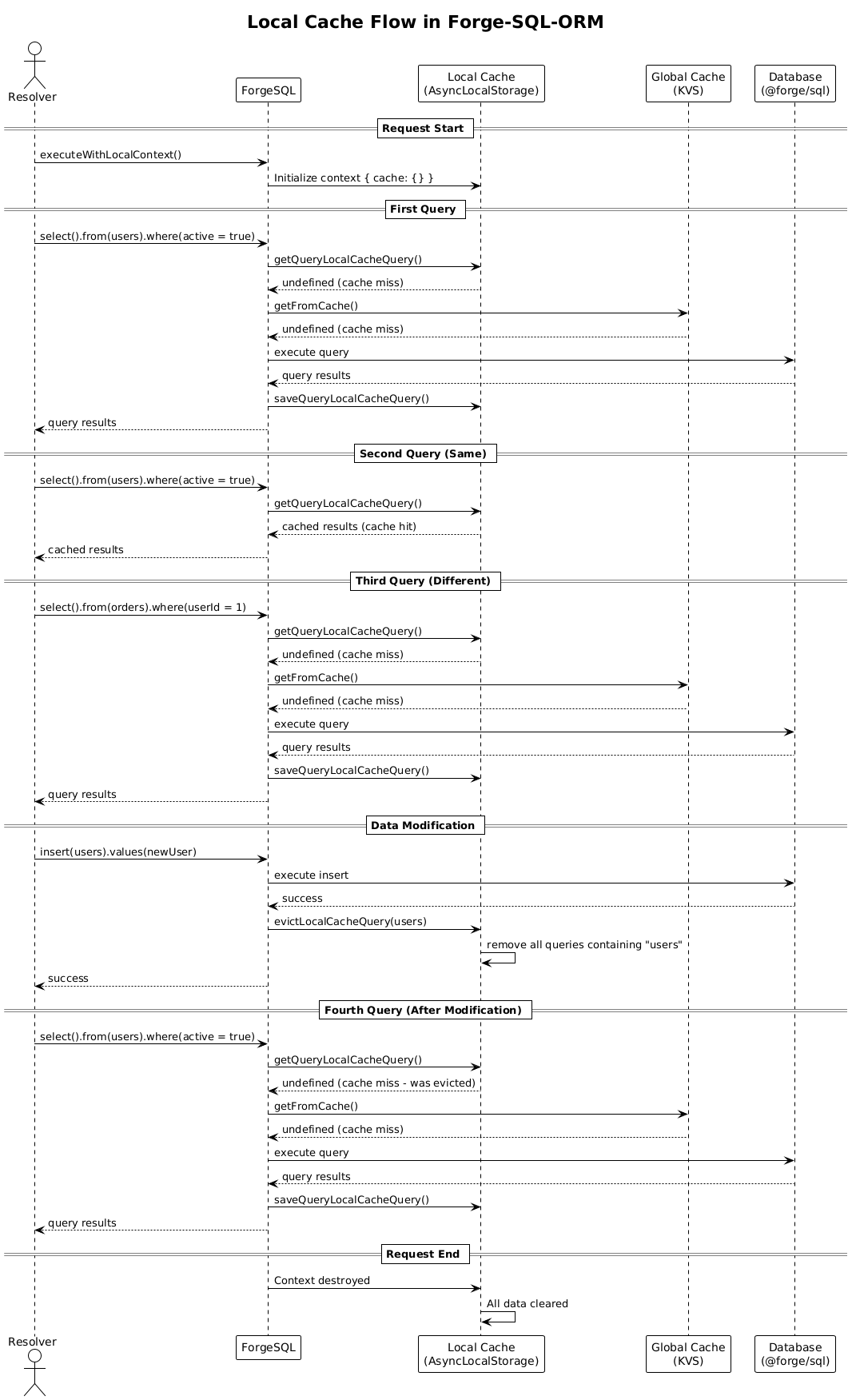
});The diagram below shows how local cache works in Forge-SQL-ORM:
- Request Start: Local cache context is initialized with empty cache
- First Query: Cache miss → Global cache miss → Database query → Save to local cache
- Repeated Query: Cache hit → Return cached result (no database call)
- Data Modification: Insert/Update/Delete → Evict local cache for affected table
- Query After Modification: Cache miss (was evicted) → Database query → Save to local cache
- Request End: Local cache context is destroyed, all data cleared
// Execute queries with caching
const users = await forgeSQL.modifyWithVersioningAndEvictCache().executeQuery(
  forgeSQL.select().from(Users).where(eq(Users.active, true)),
  600, // Custom TTL in seconds
);

// Execute single result queries with caching
const user = await forgeSQL
  .modifyWithVersioningAndEvictCache()
  .executeQueryOnlyOne(forgeSQL.select().from(Users).where(eq(Users.id, 1)));

// Execute raw SQL with caching
const results = await forgeSQL.modifyWithVersioningAndEvictCache().executeRawSQL(
  "SELECT * FROM users WHERE active = ?",
  [true],
  300, // TTL in seconds
);

// Using new methods for cache-aware operations
const usersFrom = await forgeSQL.selectCacheableFrom(Users).where(eq(Users.active, true));

const usersDistinct = await forgeSQL
  .selectDistinctCacheableFrom(Users)
  .where(eq(Users.active, true));

// Raw SQL with local and global caching
// ⚠️ IMPORTANT: When using executeCacheable(), all table names must be wrapped with backticks (`)
const rawUsers = await forgeSQL.executeCacheable(
  "SELECT * FROM `users` WHERE active = ?",
  [true],
  300, // TTL in seconds
);

// Using with() for Common Table Expressions with caching
const userStats = await forgeSQL
  .with(
    forgeSQL.selectFrom(users).where(eq(users.active, true)).as("activeUsers"),
    forgeSQL.selectFrom(orders).where(eq(orders.status, "completed")).as("completedOrders"),
  )
  .select({
    totalActiveUsers: sql`COUNT(au.id)`,
    totalCompletedOrders: sql`COUNT(co.id)`,
  })
  .from(sql`activeUsers au`)
  .leftJoin(sql`completedOrders co`, eq(sql`au.id`, sql`co.userId`));

// Using executeWithMetadata() for capturing execution metrics with performance monitoring
const usersWithMetadata = await forgeSQL.executeWithMetadata(
  async () => {
    const users = await forgeSQL.selectFrom(usersTable);
    const orders = await forgeSQL
      .selectFrom(ordersTable)
      .where(eq(ordersTable.userId, usersTable.id));
    return { users, orders };
  },
  (totalDbExecutionTime, totalResponseSize, printQueriesWithPlan) => {
    const threshold = 500; // ms baseline for this resolver

    if (totalDbExecutionTime > threshold * 1.5) {
      console.warn(`[Performance Warning] Resolver exceeded DB time: ${totalDbExecutionTime} ms`);
      await printQueriesWithPlan(); // Analyze and print query execution plans
    } else if (totalDbExecutionTime > threshold) {
      console.debug(`[Performance Debug] High DB time: ${totalDbExecutionTime} ms`);
    }

    console.log(`DB response size: ${totalResponseSize} bytes`);
  },
  {
    // Optional: Configure query plan printing
    mode: "TopSlowest", // Print top slowest queries (default)
    topQueries: 1, // Print top slowest query
    normalizeQuery: true, // Use normalizationSQL() before printing SQL (default)
  },
);forge-sql-orm-extra overrides normalizationSQL() with a parser-based strategy (node-sql-parser + regex):
- Parse and re-serialize SQL — consistent formatting and keyword casing
- Replace literals with
?via the same regex pass as core - Strip backticks added by the parser for cleaner log lines
Used automatically when executeWithMetadata(..., { normalizeQuery: true }) (default). On parse errors, normalizeSqlForLogging falls back to core regex normalization.
import ForgeSQL from "forge-sql-orm-extra";

const forgeSQL = new ForgeSQL();

forgeSQL.normalizationSQL(
  "SELECT `id`, `name` FROM `users` WHERE `id` = 42 AND `status` = 'active'",
);
// SELECT id, name FROM users WHERE id = ? AND status = ?| Package | normalizationSQL implementation |
|---|---|
forge-sql-orm |
Regex only (normalizeSqlForLoggingRegex) |
forge-sql-orm-extra |
node-sql-parser structure + regex literals |
Set normalizeQuery: false in executeWithMetadata options if a specific query fails to parse or you need the exact SQL text in logs.
// Clear cache for specific tables
await forgeSQL.evictCache(["users", "orders"]);

// Clear cache for specific entities
await forgeSQL.evictCacheEntities([Users, Orders]);
Rovo is a secure pattern for natural-language analytics in Forge apps. It enables safe execution of dynamic SQL queries with comprehensive security validations, making it ideal for AI-powered analytics features where users can query data using natural language.
📖 Real-World Example: See Forge-Secure-Notes-for-Jira for a complete implementation of Rovo AI agent with secure natural-language analytics.
- Security-First Design: Multiple layers of security validations to prevent SQL injection and unauthorized data access
- Single Table Isolation: Queries are restricted to a single table to prevent cross-table data access
- Row-Level Security (RLS): Built-in support for data isolation based on user context
- Comprehensive Validation: Blocks JOINs, subqueries, window functions, and other potentially unsafe operations
- Post-Execution Validation: Verifies query results to ensure security fields are present and come from the correct table
- Type-Safe Configuration: Uses Drizzle ORM table objects for type-safe column references
Rovo performs multiple security checks before and after query execution:
- Query Type Validation: Only SELECT queries are allowed
- Table Restriction: Queries must target only the specified table
- JOIN Detection: JOINs are blocked using EXPLAIN analysis
- Subquery Detection: Scalar subqueries in SELECT columns are blocked
- Window Function Detection: Window functions are blocked for security
- Execution Plan Validation: Verifies that only the expected table is accessed
- RLS Field Validation: Ensures required security fields are present in results
- Post-Execution Validation: Verifies all fields come from the correct table
import ForgeSQL from "forge-sql-orm-extra";

const forgeSQL = new ForgeSQL();

// Get Rovo instance
const rovo = forgeSQL.rovo();

// Create settings builder using Drizzle table object
const settings = await rovo
  .rovoSettingBuilder(usersTable, accountId)
  .addContextParameter(":currentUserId", accountId)
  .useRLS()
  .addRlsColumn(usersTable.id)
  .addRlsWherePart((alias) => `${alias}.${usersTable.id.name} = '${accountId}'`)
  .finish()
  .build();

// Execute dynamic SQL query
const result = await rovo.dynamicIsolatedQuery(
  "SELECT id, name FROM users WHERE status = 'active' AND userId = :currentUserId",
  settings,
);

console.log(result.rows); // Query results
console.log(result.metadata); // Query metadataRLS allows you to filter data based on user context, ensuring users can only access their own data:
const rovo = forgeSQL.rovo();

// Configure RLS with conditional activation and multiple security fields
const settings = await rovo
  .rovoSettingBuilder(securityNotesTable, accountId)
  .addContextParameter(":currentUserId", accountId)
  .addContextParameter(":currentProjectKey", projectKey)
  .addContextParameter(":currentIssueKey", issueKey)
  .useRLS()
  .addRlsCondition(async () => {
    // Conditionally enable RLS based on user role
    const userService = getUserService();
    return !(await userService.isAdmin()); // Only apply RLS for non-admin users
  })
  .addRlsColumn(securityNotesTable.createdBy) // Required field for RLS validation
  .addRlsColumn(securityNotesTable.targetUserId) // Additional security field
  .addRlsWherePart(
    (alias) =>
      `${alias}.${securityNotesTable.createdBy.name} = '${accountId}' OR ${alias}.${securityNotesTable.targetUserId.name} = '${accountId}'`,
  ) // RLS filter with OR condition
  .finish()
  .build();

// The query will automatically be wrapped with RLS filtering:
// SELECT * FROM (original_query) AS t WHERE (t.createdBy = 'accountId' OR t.targetUserId = 'accountId')You can use context parameters for query substitution. Parameters use the :parameterName format (colon prefix, not double braces):
const rovo = forgeSQL.rovo();

const settings = await rovo
  .rovoSettingBuilder(usersTable, accountId)
  .addContextParameter(":currentUserId", accountId)
  .addContextParameter(":projectKey", "PROJ-123")
  .addContextParameter(":status", "active")
  .useRLS()
  .addRlsColumn(usersTable.id)
  .addRlsWherePart((alias) => `${alias}.${usersTable.userId.name} = '${accountId}'`)
  .finish()
  .build();

// In the SQL query, parameters are replaced:
const result = await rovo.dynamicIsolatedQuery(
  "SELECT * FROM users WHERE projectKey = :projectKey AND status = :status AND userId = :currentUserId",
  settings,
);
// Becomes: SELECT * FROM users WHERE projectKey = 'PROJ-123' AND status = 'active' AND userId = 'accountId'You can use rovoRawSettingBuilder with raw table name string:
const rovo = forgeSQL.rovo();

// Using rovoRawSettingBuilder with raw table name
const settings = await rovo
  .rovoRawSettingBuilder("users", accountId)
  .addContextParameter(":currentUserId", accountId)
  .useRLS()
  .addRlsColumnName("id")
  .addRlsWherePart((alias) => `${alias}.id = '${accountId}'`)
  .finish()
  .build();

const result = await rovo.dynamicIsolatedQuery(
  "SELECT id, name FROM users WHERE status = 'active' AND userId = :currentUserId",
  settings,
);Rovo blocks the following operations for security:
- Data Modification: Only SELECT queries are allowed
- JOINs: JOIN operations are detected and blocked
- Subqueries: Scalar subqueries in SELECT columns are blocked
- Window Functions: Window functions (e.g.,
COUNT(*) OVER(...)) are blocked - Multiple Tables: Queries referencing multiple tables are blocked
- Table Aliases: Post-execution validation ensures fields come from the correct table
Rovo provides detailed error messages when security violations are detected:
try {
  const result = await rovo.dynamicIsolatedQuery(
    "SELECT * FROM users u JOIN orders o ON u.id = o.userId",
    settings,
  );
} catch (error) {
  // Error: "Security violation: JOIN operations are not allowed..."
  console.error(error.message);
}💡 Full Example: See the complete implementation in Forge-Secure-Notes-for-Jira repository.
import ForgeSQL from "forge-sql-orm-extra";
import { Result } from "@forge/sql";

const FORGE_SQL_ORM = new ForgeSQL();

export async function runSecurityNotesQuery(
  event: {
    sql: string;
    context: {
      jira: {
        issueKey: string;
        projectKey: string;
      };
    };
  },
  context: { principal: { accountId: string } },
): Promise<Result<unknown>> {
  const rovoIntegration = FORGE_SQL_ORM.rovo();
  const accountId = context.principal.accountId;

  const settings = await rovoIntegration
    .rovoSettingBuilder(securityNotesTable, accountId)
    .addContextParameter(":currentUserId", accountId)
    .addContextParameter(":currentProjectKey", event.context?.jira?.projectKey ?? "")
    .addContextParameter(":currentIssueKey", event.context?.jira?.issueKey ?? "")
    .useRLS()
    .addRlsCondition(async () => {
      // Conditionally disable RLS for admin users
      const userService = getUserService();
      return !(await userService.isAdmin());
    })
    .addRlsColumn(securityNotesTable.createdBy)
    .addRlsColumn(securityNotesTable.targetUserId)
    .addRlsWherePart(
      (alias: string) =>
        `${alias}.${securityNotesTable.createdBy.name} = '${accountId}' OR ${alias}.${securityNotesTable.targetUserId.name} = '${accountId}'`,
    )
    .finish()
    .build();

  return await rovoIntegration.dynamicIsolatedQuery(event.sql, settings);
}When using forge-sql-orm-extra, these options apply in addition to core options:
| Option | Type | Description |
|---|---|---|
logCache |
boolean |
Log cache hits, misses, evictions. Default false. |
cacheEntityName |
string |
KVS entity name (must match manifest.yml). Default "cache". |
cacheTTL |
number |
Default TTL in seconds. Default 120. |
cacheWrapTable |
boolean |
Wrap table names with backticks in cache keys. Default true. |
cacheImplementation |
Cache |
Default new KVSCache() on forge-sql-orm-extra. Core forge-sql-orm defaults to new NopCache(). Override for custom backends or tests. |
- Cache Example — caching with performance monitoring
- Rovo Integration Example — secure natural-language analytics
- Forge SQL ORM (core) — Drizzle driver, migrations, optimistic locking, local cache, vectors, CLI
MIT © Vasyl Zakharchenko